Proof In Another Dimension

By Melissa Donovan

With increased demand for digitally printed, short-run packaging and prototypes, there is enhanced interest in three dimensional (3D) visualization solutions. Viewing a package prior to print cuts down on costly rework, quickens time to market, and is a cost-effective method of trying out new and unique design ideas. With 3D, proofing becomes even truer to real life.

Big brand owners to print providers, sign companies, and design agencies benefit from implementing 3D visualization programs into their workflows. Today’s software is user friendly and offers features that assist in managing shorter deadlines as well as dealing with brand mangers looking to diversify their product packaging from the competition.

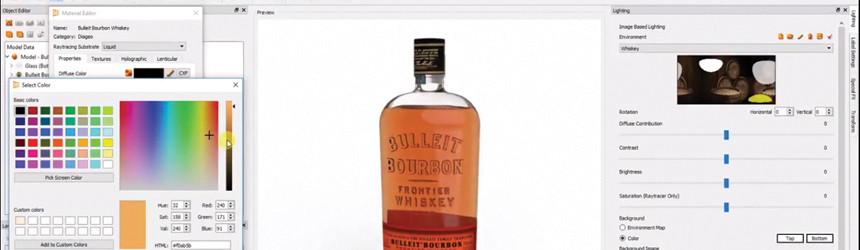
Above: 3D proofed whiskey bottle using Creative Edge iC3D.

Under Pressure
Manufacturers, printers, converters, and design agencies face shorter deadlines. Responding to the pressures of enhanced time to market means adapting solutions that make these shorter deadlines achievable. 3D visualization software is one tool that can do this. Part of the increase in its demand involves the spike in quick turnaround times.

In response to customers’ own deadlines decreasing, print providers and sign and display companies, for example, need solutions like 3D visualization software. “They need something that provides them with the ability to analyze the final box or display and verify fold and cut lines before sending to a cutter,” explains EJ Nodurft, product director, Box and Display, SA International (SAi).

“The packaging market is increasingly moving to shorter runs with very quick turnarounds. This means there is neither time, nor budget, to produce physical mockups—they’re simply too time consuming and costly considering the very thin margins that we see today in packaging production,” agrees Susie Stitzel, product manager – design and 3D solutions, Esko.

David Palmieri, director of strategic accounts and business alliances, USA, CGS Publishing Technologies International LLC, believes that trouble shooting a design at an earlier stage saves printers money and time. “Money and time that would have been spent on multiple mockups or on catching design mistakes at print. A virtual prototype helps conceptualization and troubleshooting a design, so that when a physical prototype is created, it’s done well the first time.”

“In a market focused on mass customization where short-run packaging and prototype solutions are becoming more essential, 3D tools are the ideal solution to manage design and make pre-press phases effortless,” admits Giuseppe Prioriello, founder/CEO, Packly.

Another reason for increased demand of 3D visualization solutions includes changing expectations from brand managers. According to Nick Gilmore, CEO, Creative Edge Software, principle stakeholders are younger and more fluent in digital media. As such, they request more immersive brand development experiences. Creative Edge customers say many of their own customers insist on 360 degree visualization at the earliest stage of product development and routinely want to see their brands visualized in different environments.

Also, advancements in 3D rendering technology make visualization solutions of this nature demand more prevalent. “3D technology has come a long way in terms of rendering quality and speed to create a 3D model,” says Michael Bialko, product manager, packaging workflow, Kodak.

Ray tracing is the common technology used to achieve photographic renders. Speed, according to Gilmore, is what prohibits all levels of packaging creatives from using full ray tracing capabilities. There is a quicker way to 3D visualize, using OpenGL, but this is more for gaming and doesn’t have photographic rendering quality on par with ray tracing. Recent advancements from companies like Creative Edge have succeeded in combining the speed of OpenGL with the photographic rendering quality of ray tracing.

Solving Problems
3D visualization software addresses the design and conceptualization phase of a product. It is also ideal for proofing a package prior to going on press to avoid any last minute changes post-print. These are daily challenges for many packaging providers.

CGS’ ORIS Flex Pack Web Visualizer when paired with Creative Edge’s iC3D is a turnkey solution for flexible package proofing and 3D mockup production. Utilizing the SmartShrink distortion, iC3D compensates for the natural distortion that occurs when shrink material is applied to a package’s surface. “Common pain points, such as conical warping, label, or wrap placement and shrink distortions are solved. For companies commonly working with shrink film, the ability to accurately visualize pre-distorted artwork is essential for identifying any issues,” explains Palmieri.

As packaging becomes increasingly complex in shape and design, the ability to create custom shapes and in particular non-cylindrical bottles, is an indispensable tool. iC3D’s Shape Modeller provides users with the ability to prototype unique bottles or packages. “This investment enables companies to future proof their operations as new design trends emerge, maintaining their competitive edge,” shares Palmieri.

The Creative Edge iC3D Real-Time Ray Tracer allows for photorealistic design mockups at any stage without the need for specialist programs or third party services. It also enables simultaneous photographic rendering of changes as they are made. According to Gilmore, a high-quality 1024 sample ray traced image at 6,000×3,500 pixels in size would have once taken three to four hours to render and with the iC3D software now only takes one minute and 49 seconds.

EngView Suite uses smart drafting and realistic 3D virtual modeling. It includes a comprehensive library of parametric components and designs. “3D visualization software allows manufacturers to verify all aspects of the structure design and graphic design software prior to going into production, leading to less costly errors that would not be caught in 2D design software,” admits Shawn Kirsch, North America sales manager, EngView Systems.

Esko Studio features print modeling and rendering technology. Given a packaging substrate, Studio knows how the inks and finishing will look in specified print order. It renders each ink or operation, in order, to show what the final effect will be in production. “Often, the specialty inks and finishing that we see in packaging are produced as a separate production operation and not inline with the actual printing. The ability to predict how such a multi-step production process will perform is invaluable when timing and budgets are tight. 3D visualization eliminates on-press delays caused by unmet expectations, keeping the production equipment doing what it does best—producing great packaging,” shares Stitzel.

Kodak’s 3D solution allows designers to not only create the container, but the product the container is filled with. Then the user can build a virtual store to place the product on a shelf. “Digital printing costs are expensive and with runs getting shorter, cost is critical. Creating a 3D visual package allows the designer to see their product before it hits the store shelf,” adds Bialko.

Packly’s 3D model generator creates in real time 3D box previews with custom sizes and personalized artwork. Custom 2D artwork can turn into an interactive 3D virtual model to be shared through a web link. “The 3D visualization shows the structural appearance of a product by automatically turning the 2D technical drawing into a 3D image,” says Prioriello.

SAi Box and Display software offers a gallery of over 250 box and display templates. “Many customers use CAD programs to create the shapes necessary for boxes and displays. Traditionally, these solutions may lack the ability to visualize or analyze what the final product will look like once folded. This can make day-to-day operations quite time consuming as print shops may be subject to costly iterations that can delay production. Customers can expedite the design phase and seamlessly change the dimension on existing templates with SAi Box and Display software. Once a change is made, the cut and fold lines automatically adapt to take this into consideration,” shares Nodurft.

Handle Any Job
Kaleidoscope is an independent brand consultancy with a global reach. Its offices are found in Chicago, IL; New York, NY, and Cincinnati, OH, as well as Dubai, Kuwait, and London. In business since 1995, the company offers brand packaging support services including color development, model making and prototyping, packaging comps and mock ups, sales samples, design implementation, production art, digital renderings, and fulfillment.

In 2017, Kaleidoscope added Creative Edge’s iC3D rendering and distortion software and a year later purchased the CGS ORIS Flex Pack Web Visualizer system. Prior to ORIS Flex Pack Web Visualizer, the company was using Fuji FinalProof but as the technology phased out, it needed to find an alternative.

“Fuji and CGS originally brought ORIS Flex Pack Web Visualizer to our attention a couple of years ago. We were interested in it because we saw it as a fast and affordable system with very good quality,” shares Pete Sorrentino, director of realization and operations, Kaleidoscope.

The Kaleidoscope team aspires to be able to handle any job, no matter the materials or workflow. ORIS Flex Pack Web Visualizer allows printing on a number of materials from rigid to flexible with extended color gamut inkjet printing to achieve this goal.

It pairs ORIS Flex Pack Web Visualizer with iC3D to cut down on the time needed to create renderings, distort files for shrink wraps, and produce “hold in your hand” prototypes. “That is a huge point of difference for both us and our clients,” says Sorrentino.

Complementing Kaleidoscope’s software solutions are an HP Inc. Indigo and several large format inkjet devices. Sorrentino credits digital printing in allowing the company to move quickly with great quality.

For finishing, it pairs the HP Indigo with an A B Graphic International Digicon, which allows for coating, laminating, slitting, and die cutting. A Karlville Development LLC shrink sleeve seamer is utilized for short-run shrink packaging. Esko Kongsberg cutting tables are preferred for shorter runs.

Quick and Complex
Cyber Graphics LLC, originally known as Bryce Graphics, had its start providing pre-media and plate media services to the internal print division of The Bryce Corporation—its parent company—in 1987. A few years later the company registered itself as Cyber Graphics and started selling its services to outside printers and manufacturers.

It is located in Cleveland, OH; Nashville, TN; Milwaukee, WI; and Neenah, WI, with headquarters in Memphis, TN. 120 employees work for the company. Cyber Graphics’ customers rely on the business to streamline the production of packaging graphics so they can accelerate time to market and focus on building their business and bottom lines, according to John Davis, creative director, Cyber Graphics.

Clients include consumer product companies, brand managers, printers, converters, and design agencies. For example, it creates 3D renderings for Simply 7 branded products from Dishaka; generates flexible packaging pillow bags, pallet renderings, and folding carton designs for Truco; and creates 3D renderings of flexible bags, pallet renderings, and full end cap point of purchase displays for Natural Intentions.

The company offers both physical and digitally rendered prototypes. Most of its prototypes or digital runs are in smaller quantities—one to 200 prototype pieces best fit its in-house capabilities, which includes inkjet printing. It complements its print capabilities with digital cutting tables from Esko and Zünd.

“We do quite a bit of work for a major pharmaceutical brand owner who relies on our ability to print, cut, and form folding carton prototypes. Using digital cutting tables is much better than a skilled prototype assembly person and an X-Acto knife—it saves on cutting time, bandages, and cut fingers,” shares Davis.

While Cyber Graphics has used 3D rendering technologies since they were introduced, it struggled with the complicated and hard to generate 3D packaging models. In 2010 it attempted to remedy the situation by adding a suite of other 3D products, but it wasn’t the solution it was looking for. During its research, it came across Creative Edge’s iC3D, which Cyber Graphics felt would be a better solution for its needs, especially in regards to 3D flexible packaging.

“We evaluated the software and concluded that if we were going to make a significant investment in additional software, it needed to be 100 percent production friendly to eliminate the need to have a separate art file for 3D rendering and another one for printing plate production,” explains Davis.

He reached out to CGS, a Creative Edge iC3D reseller, and in May 2013, Cyber Graphics became a beta tester of the iC3D program. It provided input specifically in regards to improving 3D flexible packaging models. “We provided critical feedback to ensure that the 3D models fit our production files that are used on actual form, fill, and seal equipment,” he adds.

According to Davis, there was no real learning curve while initially working with the program. The team at Cyber Graphics faced challenges involving how to generate custom models using Shape Modeller, shrink counter distortion, and making flexible packaging heat seals work accurately—but these were quickly overcome.

“I love how we can combine folding carton with flexible packaging and then also create a pallet rendering all in one software solution. We can generate a working model with our customers’ graphics applied in a matter of an hour or less depending on the complexity of the package and the shelf layout—if needed,” he admits.

With Creative Edge’s iC3D, Cyber Graphics is positioned to truly cater to its customer base. The solution provides the ability to modify templates already in the system to create an almost bespoke solution per customer. For example, Cyber Graphics creates a custom flexible packaging item called ConservaCube for Primary Packaging. Davis reached out to Creative Edge and asked them to duplicate this model in the software, and they did. Now that model template is available for all ConservaCube 3D model requests.

“Modifiable templates are available in many different package styles from pillow bags, stand up pouches, and candy bar wrappers to folding cartons. This speeds up the process of creating a flexible package that contains air inside along with the product. Creating a flexible package in any other 3D program requires a lot of CAD-type knowledge that most designers don’t have,” explains Davis.

Leveraging 3D Visualization
Digital printing provides a cost-effective way for companies to offer short runs of packaging, prototypes, and even product holders. The design and subsequent proofing process can be challenging and 3D visualization software is a tool that can overcome many of the obstacles print providers, manufacturers, converters, and design agencies may face throughout the process. Utilizing 3D visualization solutions assists in meeting the quick turnarounds commonly associated with today’s marketing campaigns.

Nov2018, Industrial Print Magazine
3D Visualization
Digital Print

A Personal Cut

By Cassandra Balentine

The latest in digital printing and finishing technology is designed to invigorate users to be more creative, while simultaneously improving efficiency, productivity, and the bottom line. Laser cutting and engraving devices allow manufacturers to create limitless designs without the time and expense of dies.

Whether used to manufacture or finish a product, automated finishing solutions serve a multifaceted purpose for a variety of organizations.
Based in Liss, Hampshire in the U.K., Rocket and Fox employs a fluctuating staff of three to seven, depending on the time of year. Its products are fabricated out of an industrial studio located in the middle of the South Downs National Park.

The company launched in 2010 with a focus on giftware. It utilizes a mix of materials including wood, textiles, and china for seasonal gifts, personalized décor, housewares, and accessories.

One piece of equipment instrumental in many of Rocket and Fox’s products is a laser cutter from Trotec Laser Inc. “We use the machinery primarily to cut and engrave wood, cork, medium-density fiberboard, leather, acrylic, and felt, as well as to engrave on glass,” shares Jo Lindsay, company director, Rocket and Fox.

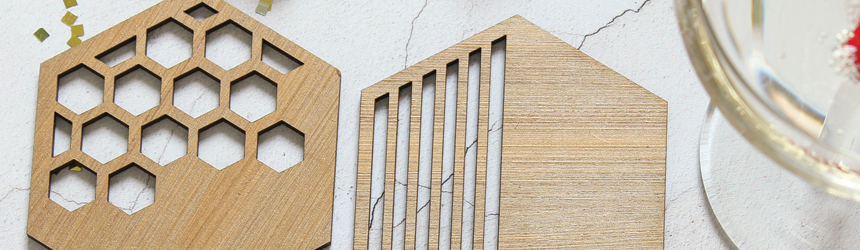
Above: Based in Liss, Hampshire in the U.K., Rocket and Fox utilizes a mix of materials, including wood, textiles, and china to create seasonal gifts for occasions, personalized decor, housewares, and accessories.

Expanded Options
The company’s first foray into laser technology started at a trade show where it witnessed a demonstration of engraving from Trotec. The team was impressed with the possibilities offered from laser engraving, but were not confident its designs would yield a good return on investment.

To get its feet wet, the company opted for an entry-level laser machine from another supplier. It outgrew the machine after only six months, finding it a challenge to keep up with demand. The company soon realized it was time to invest in a more industrial option and got in touch with Trotec to arrange a demonstration at a local showroom.

Rocket and Fox decided on a Trotec Speedy 100 laser engraver. A year into the purchase it chose to further ramp up production capabilities and expand its laser cutting and engraving services. “Having experienced the reliability, robustness, and speed of the Speedy 100, we opted to add a Speedy 300 to the Rocket and Fox studio,” comments Lindsay. The Speedy 300 offers a larger bed size and the ability to process laser jobs simultaneously, allowing the company to produce more products in a shorter amount of time.

The Speedy 100 offers a working area of 24×12 inches, while the Speedy 300 features a 29×17-inch bed. Featuring Trotec’s flexx-Technology, the machines combine a CO2 laser for cutting and engraving a variety of materials—including plastic, wood, rubber, and glass—with a fiber laser for marking plastics and metals, eliminating the need to use and maintain separate systems to process jobs that require both laser types.

In addition to its two laser cutters from Trotec, the company also employs a Graphtec vinyl cutter and an Oki Data digital printer.

The company utilizes digital print technology to produce full-color output on a range of textiles, like cotton bags. The decision to invest in digital printing came when the company was searching for ways to add optional extras to its existing products, such as selling an add-on storage bag or apron to a set of baking utensils. After looking into a few systems, it ended up investing in an Oki Data graphics art printer with white toner.

Today, all of the company’s products require some type of creation or finishing from one of these devices, and the team is in the process of researching additional technologies to further their range and become more efficient. The company plans to keep an eye on new equipment and technologies that could positively affect the business as continued advancements are made.

A Game Changer
Rocket and Fox’s decision to invest in laser cutting and engraving technology proves to be a game changer. Lindsay says its first laser cutter undeniably changed the business, helping create products not found on the wholesale market and personalize products. “This has resulted in a rise in profitability as we mostly make our own products per customer requirements.”

The company finds the biggest benefits from this technology to be the range of products it allows them to create. “The only limitation is your imagination,” comments Lindsay.

Custom Occasions
Rocket and Fox offers a range of custom items, including accessories for momentous life occasions—like weddings. One popular item is wedding cake toppers, which are fabricated in house.

To create its cake toppers, the company has a template for the actual outline. Text is overlaid with the customer’s requirements. Sometimes a job will call for something a little more bespoke, but the company staffs a team of graphic designers who quickly get the designs ready for proofing.

The standard dimensions for a hexagonal clear acrylic cake topper are 16.7×14.5 centimeters and a diameter of 0.03 centimeters. However, these can be adjusted per a customer’s requirements.

To start the process, the text/design is engraved and the topper is cut. The company uses three millimeter clear Perspex acrylic sheets from Lucite International, a group company of Mitsubishi Chemical. Once complete, the topper is carefully lifted from the sheet and protective covering is removed and cleaned before being packaged.

The challenge with this product is that cutting acrylic is highly flammable. “We have good extraction for the fumes, but there is always the possibility of small explosive fires, so we need to watch the cutting carefully and be prepared to stop everything if a fire breaks out,” shares Lindsay. The best way to avoid this scenario is to ensure the settings are correct—both power and speed—and that the bed is free of debris so there is less opportunity for ignition.

Most of the time, just one cake topper is created. However, the company can also nest multiple products/designs requiring the same material on a sheet and have them made at the same time. “For example, we could have an order for a cake topper and some place settings, if both products require the same material and settings; we can nest the designs together and avoid substrate waste. This is also a more efficient way for us to work,” says Lindsay.

What’s Next?
Rocket and Fox is constantly designing new products. One of its goals for the next year is to create a warehouse catalog to supply other shops with its creations. The team is also researching some new technologies to expand its offerings—but it’s too early to say just what.

Sellable goods come in many shapes, sizes, and quantities. Rocket and Fox relies on the latest technologies to remain innovative, efficient, and profitable.

Nov2018, Industrial Print Magazine

Digital Print
Finishing

Heightened Shelf Appeal

By Olivia Cahoon

Brand owners, cosmetic industries, and converters print directly to plastic bottles to reduce inventory, waste, and cost. In this market, bespoke or turnkey systems are available with the latter typically better for manufacturing. These solutions offer speeds up to 250 containers per minute and even 36,000 cylindrical bottles per hour.

Besides speed, other advancements are made to direct to plastic printers such as better ink adhesion and surface treatments—allowing more manufacturers to consider direct to object printing technologies in place of label printing.

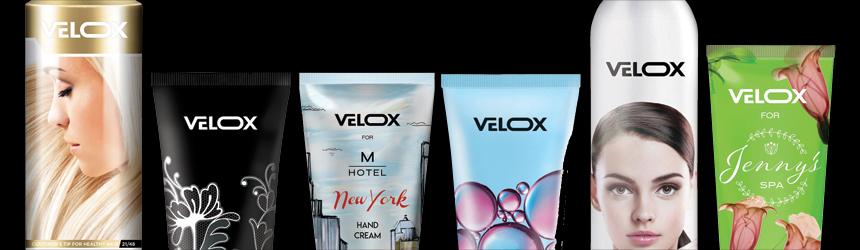
Above: The Velox IDS 250 is applicable for plastic tubes, aluminum tubes, aerosols, cans, and plastic and glass jars. It delivers speeds of 250 containers per minute or 15,000 per hour for large tubes/aerosols.

Low-Cost Shelf Appeal
Demands for large volume direct printing to plastic bottles/tubes primarily comes from brand owners, converters, and beverage industries seeking improved design and decoration as well as reduced inventory costs.

With a direct printing solution, brand owners increase marketing real estate and shelf appeal while converters reduce or eliminate waste and inventory costs. “These marketing groups realize the real estate increases when you are not limited to label size,” suggests Jim Lambert, VP/GM, INX International Ink Co. “Direct object printing can take advantage of areas that might not be suitable for a label.”

Compared to shrink sleeves and wrap around labels, direct printing is typically perceived as a more elegant decoration since it is an integral part of the product itself. Until now—in the context of plastic tubes—there was a technology barrier for direct to tube printing, reveals Ofer Nir, VP, marketing and business development, Velox Ltd.

“Direct printing significantly simplifies the entire supply chain and reduces inventories,” he explains. This eliminates third party label printing as well as shipping and logistics for synchronizing bottle/tube production or label production and filling.

Additionally, there is an ongoing trend of wide scale micro-segmentation, which Nir says translates to the need for mass customization—ideal for digital printing technologies. As a result, he predicts more conversion of long runs into multiple shorter runs, yet on a mass scale.

Industry Specific
Industry-wise, demand for direct to plastic printing comes from personal and homecare sectors as well as beverage industries. Zsolt Rozsnyai, product manager, digital direct printing, Krones, suggests these industries recognize major advantages to this technology in production, marketing, and environmental matters.

Industries seeking direct printing solutions typically focuse on significantly reducing time to market. “Marketing aspects are very important in digital packaging, personalization, and variable print data—regionalization augmented reality are the classic advantages of digital printing,” says Rozsnyai.

At the same time, direct print technologies combine bottle and artwork design to achieve both visual and haptic decoration results. This is important as companies with a variety of products battle many SKUs, an increasing amount of effort regarding label storage, low flexibility, high costs, and more waste, adds Rozsnyai. “These can be eliminated with digital printing technology and production efficiency is significantly improved.”

Custom & Turnkey Solutions
Bespoke and turnkey systems are both used for direct printing to plastic bottles/tubes in large volumes. Deciding which solution is better suited for the job comes down to the device’s specific geometry.

Whether a bespoke or turnkey device, if the machine is specifically designed for plastic bottle printing, the printhead distance or required drop distance to meet the bottle is minimized and optimized—creating the best graphic quality and resolution possible. “With digital printing, the key is to get the printhead as close as possible for a very good image quality,” explains Lambert. This is even more applicable when printing to the same bottle in large volumes.

For a technology or solution to gain significant adoption—especially in the packaging industry—it should deliver performance in multiple domains. In packaging decoration, Nir says speed, quality, total cost of ownership, and compliance are integral. “The only feasible way to deliver this level of performance is through a turnkey solution. It is the same solution for any direct to plastic bottle decoration, but the solution itself needs to be designed specifically for this objective,” he admits.

Average Speed
As the specifics of digital printing are fairly straightforward, Lambert believes the real difference between analog and digital technology is the printhead’s speed. “We have seen a variety of speeds and obviously you can gain speed improvements by redundant print engines.”

The average speed for direct plastic bottle printing today is roughly 100 to 120 articles per minute, typically without any duplication or redundancy. Analog varies as well depending on the exact process but Lambert says it’s typically faster because the process is contact printing and not non-contact or drop on demand.

Devices like the Velox IDS 250, which is designed for tubes and aerosol decoration, can deliver speeds of 250 containers per minute or 15,000 per hour for large tubes/aerosols at full quality, adds Nir. “Velox decided on this speed since it is the speed of the fastest production line.”

With other solutions such as DecoType direct print technology, device and speed is not compared to conventional labeling solutions. “The goal is not to replace the one-on-one labeling systems with digital printing, but to increase the customer’s production possibilities,” points out Rozsnyai. These devices produce a maximum of 36,000 cylindrical bottles per hour or 24,000 shape containers per hour.

Advancements
Besides physical printing, other advancements to direct printing technologies for plastic bottles include ink adhesion, surface treatments, and color management software.

The largest advances in ink and surface treatments promote good adhesion, appropriate abrasion resistance, and good visual image quality. In fact, Lambert says most ink companies are perfecting their recipe—how the article is handled before, during, and after printing—for a variety of plastics, including HDPE, LDPE, PE, PET, PETG, PP, and PVC. Other factors that directly influence the printing process encompass what type of surface treatment—if any—is applied, required over varnishes, and if the bottle can be handled the same when a label applied.

“It is all about delivering a turnkey solution. This means not only the printing/decoration system and the digital inks but also about color and print management, workflow work scope, compliance, supply-chain testing, and verification,” adds Nir.

Manufacturers Use It
Compared to label printing, direct printing to plastic bottles provides manufacturers with more marketing space and offers savings potential compared to a classic label.

Until now, digitally printed labels provided two benefits—the ability to meet short-run applications and superior decoration quality, explains Nir. At the same time, plastic bottle/tube printing presented challenges on a mass scale with adequate quality, which has since changed. “From the manufacturer’s point of view, if they have the option to print directly, and not get labels from a third party print shop—at similar or even superior quality and with better economics—clearly, they will do so.”

Today’s direct printing technologies for plastic provide manufacturers with a larger marketing and message area. In Lambert’s opinion, labels are limited, especially with bottles that feature different shapes. “Digital printing can take advantage of different features by printing over or enhancing those areas to highlight geometric features.”

By using a direct to object printer for plastic bottles, manufacturers greatly reduce time to market for new products and increase the savings potential compared to classic labels. “There is an independence from the label supplier, there are no storage costs, no waste, which can save a lot of money at the end of the day,” shares Rozsnyai. “Print quality is very good—inkjet technology works with CMYK and white—the colors are brilliant.”

Addressing Challenges
Several challenges need to be overcome for more manufacturers to use direct to object printers for plastic bottles.

Currently, one of the largest concerns for direct to plastic printing is ensuring that digital inks do not migrate into the bottle’s contents—contaminating liquids and creating hazardous repercussions for the manufacturer. According to Lambert, direct to plastic printing must be tested for every application to ensure that the ink is cured and does not make its way into the bottle.

Direct bottle printing requires a change in the current supply chain. “Supply chain evolution, specifically in the packaging industry, is a challenge,” admits Nir. However, he believes manufacturers not currently printing or decorating bottles will start to do so—a possibly easier integration than manufacturers using decorative label techniques.

Additionally, the production environment for digital printing plastic bottles/tubes must meet certain environmental requirements. For example, Rozsnyai says the room should be air conditioned, clean, and set at the correct humidity.

Recycling
Recycling also poses a challenge for direct printing technologies as today’s consumers and manufacturers become more environmentally aware and promote a “greener” tomorrow.

One of the key ink requirements for direct plastic bottle decoration is the ability to separate the decoration from the bottle itself during the recycling process. Nir believes this is feasible and therefore recyclability can be maintained.

“According to several plastic newsletters and public sites, digitally printed plastic bottles were first certified by the European PET Bottle Platform in 2013,” adds Lambert. This is reconfirmed in the interim as having no negative impact on PET—making it officially approved for bottle-to-bottle PET recycling.

A New Type of Bottle Printing
Besides plastic bottles, other items can be manufactured with the use of a direct to plastic digital printer, including cylindrical items like caulk tubes and tapered cups. With this technology, manufacturers take advantage of the product’s marketing space and eliminate the need for third party label sources.

According to Lambert, we are on the cusp of seeing many things convert to digital printing including consumer markets like bottled water. “The brand owners are going to promote this and with the variability possible, the consumer will love the possibilities.”

Nov2018, Industrial Print Magazine

Digital Print
Direct to Object Printing
Plastic Bottles

Cutting Lead Times

By Melissa Donovan

3D printing technologies are ideal in the manufacturing space for a number of reasons, but efficiency seems to be the number one factor. When businesses implement 3D printing, lead times decrease from inception to product completion.

Smaller runs or customized parts are created quickly because of the lower cost of production. Quality is still an essential element, however, especially as 3D printers are used in the production of finished parts and not just prototypes. The recent advancements in additive manufacturing technology make this possible.

Above: In 2018, Biesse looked to HP to speed up the prototyping process and even use 3D printing for final parts production with its JP Jet Fusion 3D 4200 Printer.

Global Reach
The Biesse Group is a manufacturer based in Pesaro, Italy since 1969. It offers modular solutions for furniture manufacturers to individual automatic machines and workstations for small and medium enterprises. 4,000 employees are found throughout its main production facilities and offices—globally.

One of its subsidiaries, Biesse, manufactures and markets solutions and technologies for the wood industry including furniture, windows, and other wood components. It also recently expanded into plastic processing machines with solutions catering to this specific market.

A business unit within this Biesse subsidiary is dedicated to manufacturing machines that enable edge banding, which is the application of plastic or wood to the edges of furniture. “As you can imagine, our machines must support a diverse set of assembly needs. To support them, we need to create a range of highly customized parts and tools,” explains Marco Mencarini, technical and prototype manager, Biesse.

The type of machines produced by Biesse include small, semi-automatic devices for a range of applications all the way to larger, automated bespoke versions for specific use cases. Multiple configurations and accessories assist with square and round corner edge banding. Additional variables include methods of adhesion, from glue to a system that uses compressed hot air to bond the material to the intended surface.

Early Adopter
With so many moving parts and differences between machines, customization is a large part of the manufacturing process. In the 1990s, Biesse implemented 3D printing for rapid prototyping of many of these pieces. However, as technology advanced, it looked to leverage newer machines to solve certain challenges. “We needed help in bridging the lead time gap of making metal molds and hoped to produce final parts, especially in short runs that would be impossible to profitably manufacture otherwise,” shares Mencarini.

In 2018, it looked to HP Inc. to speed up the prototyping process and even use 3D printing for final parts production with its HP Jet Fusion 3D 4200 Printer. Biesse learned about the printer through Selltek, an authorized HP reseller in Italy. Powered by HP Multi Jet Fusion technology, the printer is complemented by the HP Jet Fusion 3D 4200 Processing Station with Fast Cooling, HP Jet Fusion 3D Build Unit, and HP Jet Fusion 3D External Tank.

The printer satisfies a variety of Biesse’s goals including solving time issues, simplifying processes, and tearing down design barriers, according to Mencarini. One important need was increasing efficiency when it came to the creation of functional prototypes of the machines’ various mechanical components like piston rods, gear wheels, and joints.

For example, a gear box originally required multiple manufacturing technologies including injection molding and CNC machining. Biesse engineers took the gear box and optimized its geometry in ways that couldn’t be accomplished with subtractive technologies, creating a more efficient part that was less expensive to manufacture.

The engineers then compared the steps involved in creating the gear box using the HP Jet Fusion 3D 4200 Printer with other technologies. It took less time to produce the newly designed gear box with 3D printing than it would to set up and calibrate for CNC machining and create metal molds for injection molding.

For plastic parts, compared to using HP Multi Jet Fusion technology, CNC’s cost triples to 300 percent. Injection modeling in the first year has a cost of 700 percent, but in the second year decreases to 20 percent. Lead times are also staggeringly different based on Biesse’s comparison between additive and subtractive technologies. HP Multi Jet Fusion technology’s lead time is one day, CNC is 20 days, and injection molding 90 days.

Freedom to Manufacture
Biesse reduced lead times in the creation and improvement of its products. With the HP Jet Fusion 3D 4200 Printer, the engineers beta test a series of parts in hours instead of weeks. Another benefit, the lower cost of production allows for the creation of customized parts for specific applications. Lastly, the company is no longer restricted by traditional shapes and can design with a new level of complexity.

“It’s been six months since we started using HP’s newest technology and we are gaining powerful new insights every day enabling us to optimize our designs and adapt them for additive manufacturing. HP’s new 3D printing solution represents a whole new technology dimension for us, with limitless possibilities to explore,” says Mencarini.

Nov2018, Industrial Print Magazine

3D Printing
Digital Print

Making Brands Look Great

By Olivia Cahoon

Digital printers are capable of printing to corrugated materials for a range of packaging applications, including mailers, shippers, and custom boxes. They print directly to the substrate or to a liner, which is applied to the corrugated material post print. As both techniques advance, packaging manufacturers are driven to invest in digital technology.

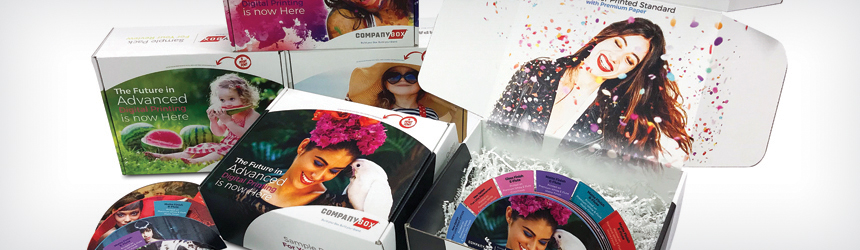
Above: CompanyBox of Charlotte, NC works with multiple digital presses from HP to produce its 13 categories of packaging products, including mailers, shippers, POP displays, and trademarked Event Trash Boxes.

Build Your Box
Established in 2016, CompanyBox LLC brings experience and knowledge from its sister company, Third Dimension Inc. Headquartered in Charlotte, NC, the custom box manufacturer started with two employees and now operates with 34. It ships to Canada and the U.S. from its locations in NC and OH. Each facility is equipped with the latest equipment to ensure boxes are printed quickly.

CompanyBox’s mission is to be the producer of choice when it comes to online digital packaging suppliers. It offers custom digitally printed packaging at all volumes. “Investing in people, equipment, and facilities to meet these goals is very important to us,” says Louis DeJesus, president, CompanyBox.

The manufacturer only uses digital technology to produce its 13 categories of packaging products, including mailers, shippers, point of purchase (POP) displays, and trademarked Event Trash Boxes.

CompanyBox also produces subscription packaging to support e-commerce. All of its products are designed to increase brand awareness, including custom inserts as well as printed graphics and text featured inside the boxes.

All Digital
Although CompanyBox started in 2016, DeJesus says his journey towards custom packaging began 35 years ago when he worked for a corrugated company. “I was so tired of seeing plain brown boxes that I would print two-color images with a plotter and glue them to the outside boxes to present to my customers.” However, it wasn’t a perfect system. According to DeJesus, the glue bubbled and warped the paper, but it was these early experiments that brought his ideas to fruition.

Today, 100 percent of CompanyBox’s gross margin is generated from digitally printed applications. It currently uses HP Inc. Scitex 15500 and 17000 Corrugated Presses, a flatbed die cutter, seven digital cutting tables, and three roll die cutters. “All of our digital printers support speed to market,” comments DeJesus. “The HP Scitex platform is stable and handles warped sheets of corrugated where most other printers cannot.”

With this technology, CompanyBox produces graphics on corrugated materials with minimal limitations. Packaging and displays are customizable for target groups and regions. Customers take advantage of relevant pop culture events. “You only have one opportunity to make a first impression. Your package is that chance—make it count,” offers DeJesus.

While CompanyBox is an all-digital packaging supplier, it still finds converting smaller volume orders at high frequency a challenge. High-volume orders are converted with cutting dies and flat die cutters that run at 3,000 sheets per hour.

If using roll die cutters, a cutting die must be ordered, which can compromise lead time. “We are now playing with the idea of producing our own dies in house,” admits DeJesus. To streamline its smaller volume orders, the company recently hired a die maker. Despite these challenges, CompanyBox promises all orders ship within ten working days regardless of volume, which includes lead time for tooling if needed.

Impressions with Every Shipment
In May 2018, CompanyBox announced its purchase of the HP PageWide C500 Press for high-quality digital post-print corrugated packaging. The investment supports CompanyBox’s all-digital plant strategy to meet brands’ demands for greater flexibility and higher customization in corrugated boxes, displays, and packaging.

“We chose the HP PageWide C500 because of the print quality including the four-point text, color gamut, fine lines, skin tones, and barcode readability,” says DeJesus. CompanyBox also selected the device to help support the continued growth of its online digital packaging business to add capacity, and high-end printing and coating options.

The press uses true water-based inks, which help the manufacturer support its food-based customers. “HP’s true water-based ink technology meets many stringent standards, including Swiss Ordinance and Nestlé Guidance,” adds DeJesus.

The HP PageWide C500 runs over 65,000 square feet per hour (sf/h), giving CompanyBox much needed capacity. It delivers consistent offset print quality for a range of corrugated applications on both coated and uncoated paper, along with post-print process simplicity. The press handles boards up to 51.9×98.4 inches with an F flute to BC double-wall flute thickness.

The the HP PageWide C500 installation started the third week of August and production began the second week of November. “With all three of our presses we can print over 85,000 sf/h. We run a two-shift operation, so with downtime we can produce over 20 million square feet per month of digitally printed packaging.”

CompanyBox intends to support its new Luxe printing option on CompanyBox.com with the HP PageWide C500. This advanced option is the highest end printing the manufacturer offers and also includes soft touch coating. According to DeJesus, the Luxe printing option is exclusively produced on the HP PageWide C500 because it prints at 1,200 dpi.

In with the New
Compared to traditional manufacturing techniques, digital printing often requires a different mindset.

The manufacturer is commited to bringing in new accounts, developing a new structure, laying out new artwork, producing anywhere from ten pieces to thousands, and shipping from CA to NY in ten days or less. This requires its inside sales employees to be trained in and understand graphics, prepress, most major graphics software.

Unlike traditional manufacturing, digital printing also gives CompanyBox the ability to print interactively using HP Link Technology, which embeds a unique digital mark or link within the packaging and creates a personal media channel companies can update, personalize, and measure in real time. Since the content is virtual, DeJesus says users can update without needing to recreate the packaging.

The Power of Branding
With the HP PageWide C500, CompanyBox intends to create custom packaging for retail, food, e-commerce, POP, and to address the packaging needs of the cannabis industry. As digital packaging is 100 percent its business, the manufacturer also plans on producing custom printed resealable pouches to match custom printed shippers. CompanyBox’s customers have unlimited opportunities both inside and outside their packages.

Nov2018, Industrial Print Magazine

Digital Print
Packaging

Surface Prep

By Cassandra Balentine

The ability to print to glass opens up a range of opportunities for the digital print industry. However, this process may prove difficult as many variables come into play.

Pre- and post- treatments for printing to glass aid in prepping the glass surface to ensure adhesion success.

Types and Considerations
In theory, any type of glass can be printed onto. The two most popular types of printed glass include float or flat glass and container glass.

Phil Jackman, global product manager, digital, Sun Chemical Corporation, says that the printed glass market is divided into flat glass and hollow glass—jars, bottles, and cups. He says the latter requires quite a different printer architecture to handle the different shapes. “The actual color and surface of the glass substrate doesn’t really affect the printing process, but it must be noted that bottles often have a wax coating applied at the cold end of the bottle production that is ideally burnt off in pre-treatment prior to direct printing.”

Many factors influence surface tension—or dyne level—and the adhesion of ink on glass. Sean Lanigan, president, Applied Surface Technologies, LLC (AST), explains that some of these variables are easily resolved, while others require specialized processes. He adds that everything impacting adhesion of inks and coatings on glass falls into two main categories, corrosion and contamination.

Corrosion comes from within the glass itself or something that attacks the surface. Lanigan says chemicals within the glass reacting with one another and lime scale are examples of corrosion that could affect ink adhesion.

On the other hand, contamination is something that can be applied to the glass or that may land on the glass surface but may not damage the surface. Mold release coatings and dust are examples of contamination, explains Lanigan.

He also notes that there are additives used to color glass or change certain properties, but these normally don’t cause more issues than clear glass.

Treatment Options
Several pre-treatment options are available to help improve the surface tension of glass to enable digital printing.

Primers are easily applied and available from many sources, including equipment manufacturers, ink manufacturers, and industry suppliers. “Some testing is usually necessary to find the right primer for the adhesion and durability required. Keep in mind that a primer that works great for plastics or metals may not offer any adhesion improvement with glass,” recommends Lanigan.

He suggests that some pre-treatment will always be required with glass to ensure a proper hydrophilic surface. “This can be achieved with glass cleaners, primers, or specialty glass cleaners like Glass Renovator from ClearShield Technologies, LLC or Vitranova from Vindico Surface Technologies. It is also possible to use a propane torch to remove contamination and get a good dyne level. These are available at any hardware store for under $20,” he shares.

He adds that it is also possible to use a post-treatment solution like a spray coating to protect the ink print. Acrylic and clear coat sprays work well for many applications and can be purchased at hardware stores. He says many of the UV ink manufacturers including Marabu North America, Peter-Lacke GmbH, RUCO Druckfarben, and Sun Chemical offer more industrial spray-on coatings for higher speed production.

If you have a good dyne level on glass, which would be a measurement of 45 or higher, Lanigan says you can digitally print on glass. “Different inks react to different glass surfaces in various ways. Some inks may allow for a limited scratch resistance, while other inks may be removed by simply wiping the surface. How inks react to the glass and the adhesive properties must be tested,” he cautions.

There are two ways to alter the glass surface tension. The first, says Jackman, is to apply a spray pre-treatment, such as Sun Chemical’s SunVetro Glasprep. “This aqueous coating is applied to the glass as a fine mist and must be thoroughly flame dried prior to decorating.”

The second option is utilizing Pyrosil technology, which applies a flame and a proprietary liquid mix to the surface, leaving silicon dioxide (SiO2) on the glass making it hydrophilic. Pyrosil is available through AST. “Pyrosil is a flame technology that deposits SiO2 onto surfaces—including glass—and changes the surface allowing for 72+ dyne level and greatly increased adhesion and durability. This technology is easily applied using a handheld torch, tabletop unit, semi-automated, or fully automated process depending on customers’ needs and output demand,” explains Lanigan.

He explains that Pyrosil was developed in the 80s and is required by BMW and Jaguar for their authorized automobile repair facilities.

AST offers a variety of additional primers and pre-treatment solutions. In addition to Pyrosil, the company is the North American distributor of primers from Germany-based Modico Graphic Systems and SURA Instruments.

Lanigan says pre- or post-treatment is recommended in nearly every situation, but there are exceptions. “If you are making an enclosed glass display where the ink will not be exposed nor require cleaning, pre- and post-treatments may not be necessary,” he explains.

Pre-treatment of container glass is critical to achieve optimum adhesion. Jackman shares that the reason for this is that glass containers commonly have anti-scuff coatings applied during manufacture. “To achieve adhesion, the surface of the glass must be altered,” he comments.

For greater scratch resistance, pre-treating the glass with primer—like wipe on, spray, and printable corona/plasma, flame, or Pyrosil treatment may be enough to meet customers’ requirements, adds Lanigan.

Limitations
While pre- and post-treatments are available to aid in the adhesion of ink to glass using digital print processes, there are limitations. For example, food safety is one consideration.

Inks for printing onto glass are only suitable for the non-food contact side of glass containers, points out Jackman. “As glass is considered an effective barrier for migration, there aren’t too many restrictions on the ink chemistry options,” he shares.

“Some acrylate-based inks do not contain any mono-functional acrylates and use polymeric photoinitiators to initiate the polymerization reaction. It is is crucial to full cure the ink with the specific UV dose to maximize the degree of polymerization,” explains Craig Greenwood, sales manager, North America, Tiger Drylac U.S.A., Inc.

If a pre- or post-treatment is to be used for food and beverage applications, Lanigan says there are FDA regulations and requirements although they may not require FDA approval, which can be quite expensive. For example, if printing will not come into any contact with the lips, you can decorate a beer bottle and it would not require FDA approval.

The state of CA’s Proposition 65 should also be considered, cautions Lanigan. “Many chemicals are restricted, check with the supplier and/or manufacturer of all products and enhance compliancy,” he recommends.

Besides food safety, factors such as exposure to water come into play. Lanigan suggests that when looking at digital printing that will be exposed to water, like drinkware, beer, and spirit bottles, a more specialized treatment process is required. Corona/plasma or Pyrosil in conjunction with primers can withstand hundreds of dishwashing cycles. “I am not aware of any primer that can withstand more than a dozen cycles in a dishwasher, although there are continuous improvements in the industry,” shares Lanigan.

Getting to Glass
Printing directly to glass with digital technology is an attractive solution. However, printing to this medium requires proper surface tension. Pre- and post-treatments help ensure a high-quality result.

Nov2018, Industrial Print Magazine

Coatings
Digital Print
Glass

UV for Packaging

By Cassandra Balentine

Digitally printed packaging represents a major opportunity for manufacturers looking to expand into new markets. Features inherent to UV LED and UV-curable inks—including immediate dry time and enhanced adhesion characteristics with many types of media further the availability of extended color gamut, especially when white is considered—add value to packaging applications.

Above: The Canon Oce Arizona 6100 High Flow Vacuum Series is ideal for corrugated packaging material.

UV Advantages
UV-based inks provide a variety of advantages, which translate well to package printing.

“Going back to the early days of UV inkjet—before 2000—it was all about getting the ink and printhead to work together reliably so that the integrators could build some hardware around the printhead. Today’s ink must cure faster, respond to pinning, run in faster systems, reliably print with smaller droplets, work in high frequency printheads, be compatible with new media types, and the list goes on,” shares Phil Jackman, global product manager, digital, Sun Chemical Corporation.

He points to a variety of advantages of UV inks including instantaneous dry time, excellent printhead open time, high productivity, reduced printhead maintenance intervals and longer life, reliable jetting, wide media compatibility, inherent adhesion performance, wide color gamut, proven ink technology, reduced energy consumption compared to drying of water-based inks, and compatibility with heat-sensitive-media—especially UV LED cured.

“One of the biggest advantages of UV inks for digital packaging is the substrate versatility, often without use of a primer,” says Mike Barry, product marketing manager, Fujifilm North America Corporation, Graphic Systems Division.

Juan Kim, CEO, Valloy Incorporation, agrees, and says that UV inks bond to various packaging substrates strongly these days, for both flexible and rigid applications. Furthermore, special color inks like white, varnish, silver, or fluorescent are available.

White ink is another advantage. “White ink opens up the possibility of printing on surfaces that range in color, this includes metallic foils,” agrees Michael Maxwell, senior manager, Mimaki USA, Inc.

Deborah Hutcheson, director of marketing, Agfa Graphics, believes digital UV package printing is more cost effective, offers faster turnaround, and reduces overhead with just-in-time inventory. “There is no need to warehouse thousands of boxes when a job can be printed and shipped out immediately.”

“The ability of UV inkjet printing on corrugated is lucrative because prototypes are produced quickly and efficiently,” continues Hutcheson. She adds that brands are also leveraging secondary packaging—corrugated displays and end caps—as a way to increase their messaging. “Brands are driving more customization and more personalization on the package itself, which lends itself to a short-run digital UV printing process.”

Patrick Donigain, senior marketing specialist, Canon Solutions America, says UV is also durable and resistant to scratching, fading, and water. “As a result of these properties, it’s a relatively simple transition from printing signage to printing on corrugated boxes and temporary displays.”

Curing Considerations
The dry time of UV inks is one of its biggest advantages. With the use of UV and UV LED lamps, output printed with UV inks is cured instantly. However, UV LED curing also offers the benefit of reduced heat and energy consumption.

Maxwell says the instant dry time of UV inks means that bleeding and migration issues often associated with other inks are not prevalent. “This also offers the added advantage of printing to uncoated paper goods, such as corrugated board, without concerns of the ink wicking into the material.”

“The marriage of UV or LED lamps to ink combination is imperative to the UV printing process,” notes Barry.

Hutcheson points out that UV LED curing allows for a broader scope of print applications and enables printing on heat-sensitive substrates such as corrugated board and cardboard. “As less heat dissipates from an LED lamp, it is easier to keep the media flat under the shuttle, eliminating disruptions. The investment in LED means fewer reworks and less media and ink waste in the long term.”

According to Kim, UV ink curing is more sophisticated than other processes. “UV light wavelength and power can determine cured portion of droplet, curing speed, and bonding strength.

“Curing on porous media like that used in liners can be very tricky,” cautions Donigain. “It is important that ink volume and suction is controlled as to not allow the inks to penetrate too deeply. If the inks penetrate the liner too deeply they may not cure fully. Using the right amount of ink, suction, and lamp intensity allows manufacturers to ensure that the ink is fully cured.”

Jackman notes that mercury UV lamps are utilized in all applications where UV inks are used, but recently there is a strong trend towards LED cure due to all the operational benefits provided. “For most applications, LED lamps work perfectly well when the correct ink chemistry is developed, but the availability of electron beam at the right price and dimensions could mean that it will start to be adopted more readily in labels and narrow web, wherever low migration is required.”

Specific to Packaging
Before a package is ready for the mainstream, it must meet several requirements. This includes shelf appeal and life, enhanced communication, recyclability and sustainability, and weight considerations. “Also consider the complex regulatory landscape as the industry strives to make food packaging safer,” shares Jackman.

Several feature sets are attractive for manufacturers looking to produce packaging applications.

Donigain says the primary advancement setting UV ink up for packaging is media handling capabilities. “Corrugated boards are porous and usually warped. These two factors make it difficult to create a flat print surface with corrugated boards. With digital print technology, boards that aren’t flat can create reduced print quality, damage the printheads, or create jams.”

Recycling is another aspect to consider. Raimar Kuhnen-Burger, regional marketing manager – industrial print, EFI, suggests it is important to keep corrugated packaging a highly environmentally sustainable packaging choice. “It is important that ultra-high-speed digital inkjet production technologies do not negatively impact the corrugated recycling supply chain and keep full repulpability.”

“Additionally, some ink manufacturers are developing multiple inks that support more specific applications, for example, different varieties from rigid to flexible, each one specifically designed to meet an application demand,” explains Maxwell.

Pre-Treatment or Coating
While UV ink adheres to many substrates without the need for special coatings or primers, these solutions do play a role.

Kuhnen-Burger says the paper industry has released only a few board types developed especially for digital print. Because of that corrugated packaging performs best with a primer. “Having a primer gives customers control over dot gain and ink absorption on different types of corrugated top sheets. And, it keeps the output consistent, even if there are slight surface deviations from one production lot to another.”

Hutcheson adds that depending on the material being printed and the ink’s ability to adhere to that surface, certain packaging applications may require a pre-treatment. She says for example, some packaging materials feature an extra slippery surface or surface that doesn’t provide the ability for the ink to grab. Pre-treatments help with adhesion.

“Whether or not pre-treatment is required for the application, UV inks are very receptive to pre- and post-coatings. This makes UV inks ideal for most packaging applications,” shares Barry.

“There are some grades of ink that vendors claim do not need primers. However, it is safer to use primers for certain substrates,” suggests Kim.

Food Safety
One major consideration in packaging is its use with food and beverage goods. Packaging that makes direct or indirect contact with food is a complicating factor for production.

Mike Barry, product marketing manager, Fujifilm North America Corporation, Graphic Systems Division, points out that different migration level properties and curing technologies are being tested to make UV ink more viable for food safe packaging.

Many UV inks are already rated for food safety, according to Michael Maxwell, senior manager, Mimaki USA, Inc. “As demand grows in this area, more manufacturers will develop and certify their inks to support this.”

Deborah Hutcheson, director of marketing, Agfa Graphics, says Agfa is committed to the research, manufacturing, and testing of its UV ink solutions. “Our ink portfolio includes low-migration UV ink for food and pharmaceutical packaging applications,” she says. Low-migration ink does not move from the package to the food product.

Phil Jackman, global product manager, digital, Sun Chemical Corporation, points out that one of the main priorities for brand owners, converters, and customers is compliance and the issue of migration. Once mainly concerned with conventional printing, low migration and compliance are also important factors in digital printing and if not handled correctly, could have potentially severe consequences, such as damage to a brand’s reputation and risks to consumer health.

He says during the packaging design stage, particular attention is spent to ensure the correct packaging materials are used to protect the various food products. “The selection of inks and coatings are equally important. To ensure Sun Chemical inks meet the necessary requirements and legislations, there are several factors that need to be considered, including an understanding of the legislation that regulates package printing, a knowledge of migration and the prescribed limits, and a responsibility for ensuring that packaging is correct for its end use utilizing correct testing protocols through all key players on the supply chain,” continues Jackman.

Juan Kim, CEO, Valloy Incorporation, believes that due to food safety issues, major companies promote water-based latex or toners, but UV is still the most promising technology to print on both flexible and rigid uncoated substrates. “There are meaningful activities that develop and propose a certain grade of inks to be approved for use on food packages.”

Conversely, Patrick Donigain, senior marketing specialist, Canon Solutions America, is not aware of any UV ink food safe packaging efforts. “As far as I am aware, the very nature of UV inks makes them unsuitable for direct contact with food. Water-based inks dominate the application.”

Consider UV
Several areas of packaging benefit from UV and UV LED printing equipment. While there are some challenges to consider, this ink’s many advantages make it an attractive option for packaging applications.

Nov2018, Industrial Print Magazine
Digital Print
Packaging
UV Printing