Corrugated Accomplishments

By Cassandra Balentine

Successful businesses adapt to the evolving needs of those they serve. For print and packaging providers, brand owners are looking for flexibility in ordering and the ability to cost-effectively obtain quick samples, shorter runs, and fast turnaround times.

Digital printing technologies provide an excellent complement to many traditional environments, enabling these businesses to provide sample making, quick turnarounds, shorter runs, and versioned customization.

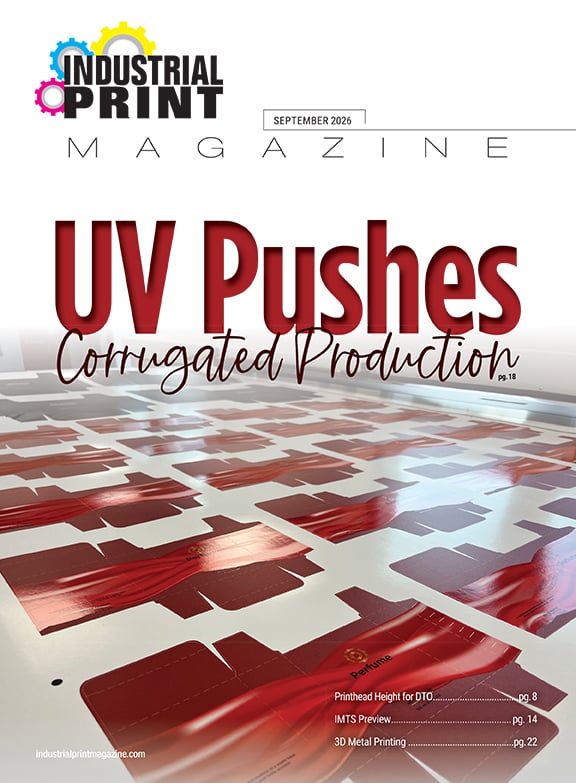
Above: The SUN Automation CorrStream Series 66 produces custom corrugated box runs for customers of HSG.

Driven to Digital
HSG is a packaging printer located in Bradford, U.K. With 46 employees and one 45,000 square foot facility, the company has continuously evolved since its start in 1978.

It originally focused on wooden packing cases. Soon after, it expanded into heavy corrugated production to diversify its product offerings. In the 1990s it invested in a large format case maker and a second small format case making machine. In 2000, the company started offering color sample making and added an in-house design department.

“Our old business model operated around the principles of flexographic printed corrugated work and lithographic laminate corrugated work, in both the volume markets and point of sale markets,” explains Ben Ginesi, managing director, HSG.

The company acted when it realized there was a change in customer requirements. The packaging provider noticed a need for more flexibility within the print process, which would enable several downstream benefits, including personalization, better customer stock management, and versioned prints.

It decided to invest in a digital corrugated solution to address these needs in January 2016. HSG partnered with SUN Automation Group to serve as a beta site for its CorrStream Series 66 digital inkjet printer.

“SUN Automation understands what is required to bring all the constituents parts together for the delivery of a single-pass, water-based digital corrugated printer,” says Ginesi. “It seems to have a clear development path for what is required today and what is required tomorrow from the technology.”

At press time, Ginesi shares that the system is moving through the beta phase and is the only one of its type in the world.

The digital corrugated printing press is a self-contained solution that offers a conventional machine setup with continuous lead-edge feeding, printing, and delivery to box converters. The printer does not need plates or makeready, which helps reduce the amount of time needed to produce a finished box. It utilizes water-based ink.

A CMYK color digital printer for corrugated output, the CorrStream outputs production runs at speeds of up to 8,000 sheets per hour. Available in three models—Series, 20, 40, or 66—each provides High Quality Post Print quality. It features drop on demand, aqueous, industrial inkjet printheads. Maximum color and ink cost control are monitored with CorrStream Dynamic Color Range technology.

The core applications for the technology center around short- to medium-run length work, with multiple print variants of consistent sheet sizes, shares Ginesi.

To accommodate the press, the package printer completely redesigned its workflow from its existing processes to the initial point of customer contact. “It is a completely different process to maximize the customer experience,” says Ginesi.

Application Focus
HSG relies on the SUN Automation CorrStream for digitally printed corrugated packaging. “100 percent of what we manufacture on the machine is corrugated,” says Ginesi. The company produces everything from self-ready packaging kits for major retailers to two-color industrial packs with print variants.

The installation enabled the company to expand into markets that weren’t possible a little over a year ago. “We are also involved in many different routes to those markets. The technology changed how we interact with our customer and the end user brands,” comments Ginesi.

To maximize the full potential of the press, HSG designs its artwork in house.

The company creates custom corrugated box runs for a range of clients. Such as a recent run of 48,500 245x345x85 millimeter corrugated boxes, which fit within the specifications suited for production on the SUN Automation CorrStream press. Additionally, the press’ digital capabilities ensured accurate registration, which would be difficult or impossible to achieve with traditional printing methods.

The company is now able to produce a variety of shapes and sizes of corrugated packaging, while offering full-color digital and personalization or versioning to its clients.

Looking Ahead
HSG utilizes the SUN Automation CorrStream Series 66 press as a complement to its existing business. However, it is predicted to become increasingly important to the company’s operation.

Ginesi estimates that about 15 percent of its business is currently digital, and forecasts customer demand that could lead to a growth rate of 23 percent on an annual basis.

While the company is still managing the adjustment of implementing the technology, it is optimistic about digital’s place in the organization. “The biggest challenge is the sheer amount of change required to allow the technology to flourish,” admits Ginesi.

“We currently see digital as complementary to everything that we have in our business today. However, over the next seven years, we believe that it will be the only print technology used,” states Ginesi. “The reason is that we see a shift in the market for customer requirements that are aligned with digital benefits.”

The biggest advantage is that the technology allows HSG to offer customers more choices, something the corrugated industry is unfamiliar with.

Digital Direction
HSG continues its work with SUN Automation through its beta program. In the meantime it plans on developing the business to business marketplace for the industrialization of corrugated inkjet.

Nov2017, Industrial Print Magazine

Designing Made Easier

By Olivia Cahoon

Digital print provides a cost-effective way for companies to offer short runs of packaging, prototypes, and even product holders. But constructing a three-dimensional (3D) box shape, designing multiple sides, and ensuring accurate measurements fit together can be challenging.

To help, vendors offer 3D visualization software programs specifically targeted toward packaging and prototype creation. These solutions solve design errors before beginning the print process—reducing the need for reprints and saving time and cost.

Above: Creative Edge Software iC3D includes a Shape Modeller feature to create complex models like perfume bottles, spray triggers, and molded containers.

Targeting Package and Prototype Creation
3D visualization tools include features for 3D modeling, designs, layouts, measurements, and templates. These help manufacturers and print providers sell and market solutions while effectively producing packaging applications. Software vendors target the digital packaging space with visualization features for creating and viewing visual mockups while highlighting features that streamline the production process.

“The ability to visualize the finished product in 3D is an essential part of boxes and displays,” says E.J. Nodurft, product category director, CNC machining and packaging products, SA International (SAi). While prototyping grants clients design creativity, it also leads to multiple versions of different designs that require customer approval. With 3D visualization software, customers can approve software designs without ever needing to print.

Most software includes templates that provide pre-made designs with customizable features. “Users choose from extensive libraries of models, templates, and materials or import their own 3D structural files,” shares Heath Luetkens, director of technical innovation, Creative Edge Software. Templates are best suited for designs and print providers unfamiliar with structural work.

Templates also verify and analyze the folding process to ensure the final folded design fits together correctly. Without this, Nodurft says print providers would need to cut the design and physically test it. “This could prove costly in terms of time and resources,” he explains. Printed test designs that need further revisions repeat the testing and printing process until designed correctly. “3D visualization overcomes these barriers by rectifying errors in the template dialog box, the parameters, and settings therein,” continues Nodurft.

According to Luetkens, many software design programs can take up to 12 hours to render a package before knowing it’s aligned correctly. Using a 3D visualization solution, the design process is cut from hours to minutes—allowing designers to identify flaws before the design is sent to print. “3D visualization provides designers with the ability to catch what would be costly mistakes sooner,” he offers. Visualization solutions also help designers avoid incorrect placement, which could affect the entire design.

3D modeling features quickly create complex models including structures and graphics. Originally, manufacturers were required to make changes to a two-dimensional (2D) flat design—a longer process that required more trial and error. 3D models allow customers to inspect all sides of the structure for a faster approval process. They also eliminate post-production rejects. Designers can treat 3D models as real-life proofs.

Layout features calculate one or multiple interlocking nesting patterns for on-press efficiency and minimum material waste. Arden Software offers Impact, a solution for designing paper-based packaging and production tooling. The software includes an automatic layout feature that tracks material type and flute/grain direction to ensure packaging designs maintain correct orientation when added to a sheet.

With measurement features, designs are scaled accurately for print output—presenting customers with a professional printing process. These features ensure 3D graphics are positioned correctly in relation to box cutout shapes. Nodurft offers, “this gives print providers the best perspective in terms of the design and results in a high-quality finish of the finished design compared to a 2D graphic.”

Shrink wraps and sleeves are applicable in various industries but require accurate sizing. Some visualization software offers placement and sizing tools specifically designed for shrink packaging.

Released in 2013, Creative Edge Software’s iC3D is a 3D visualization solution that includes SmartWrap and SmartShrink features for accurate shrink artwork and shrinking to fit in seconds. iC3D also provides photorealistic render and dynamic background capabilities for marketing strategy tools. “Generate pre-release and product promotional materials without physical mockups or photoshoots at a fraction of the cost,” says Luetkens.

iC3D includes a Shape Modeller feature to create complex models like perfume bottles, spray triggers, and molded containers. According to Luetkens, Shape Modeller allows for the creation of complex shapes like ice cubes and glassware. “This gives users more versatility in displays and promotional materials,” he adds. iC3D also includes bump displacement for enhanced emboss and deboss control.

At Labelexpo Europe in Brussels, Creative Edge Software announced iC3D v5.0. Advanced Shape Modeller offers additional tools for the creation of highly complex 3D shapes and combinations of shapes. A new Sealed Shrink feature visualizes shrink-filled packages using completely sealed bags. This complements the existing Shrink Sleeve feature.

Esko’s Studio Advanced for Adobe Systems Incorporated Illustrator also includes features for shrink sleeves. Its studio toolkit simulates a heat shrink sleeve around one or more objects. With Studio Advanced, shrink sleeve jobs can take as little as two to three hours. The software also features a studio toolkit for flexible packaging. It creates 3D models with options for package types like geometric shapes and fills like air and liquid. The flexible packaging toolkit is used to design packaging for pillow bags, gusseted bags, sealed porches, and diaper bags.

3D software features take the guesswork out of structural design to minimize error and enhance the proofing process. Manufacturers save time by accurately designing and visualizing packaging and prototypes.

Simpler Solutions
Traditional 3D software solutions can be complex and difficult to learn. For easier integration into the design process without time-consuming training, 3D visualization software is ideal. Designers and manufacturers already familiar with traditional design software generally have an easier time learning how to use structural design programs.

Luetkens believes any one at ease with Adobe Illustrator will find updated 3D visualization software instinctual. He says two days of training is generally sufficient enough to understand how to operate it.

Robert Bou, co-founder, AlphaCorr, LLC, agrees and says the software is very simple. “Anyone who uses Adobe Illustrator at even a rudimentary level can achieve the results they need within a few minutes of orientation,” he offers.

The AlphaCorr Folding Genius 3D v2 is created for Adobe Illustrator. Released in January 2015, the software works directly with artificial intelligence data and is compatible with Mac and Windows. It supports 3D visualization of dielines created in or imported from box design programs like Esko’s ArtiosCAD and Arden Software’s Impact.

According to Bou, the Folding Genius 3D performs multi-piece assembly and exports 3D PDFs for direct use or imported into advanced presentation software. The solution is $195 a year or $29.95 per month.

3D visualization software is also available as cloud solutions to assemble, design, and share parts and drawings from any location. Onshape Inc. offers a cloud CAD solution that accesses CAD data and model parts from any cross-platform web browser or iOS/android phone or tablet. It offers the ability to add or revoke access privileges to protect company data. Onshape also stores CAD data in a database for all users to view design changes.

Other visualization solutions are specially designed for specific 3D printing equipment to make usability simple. Afinia Studio Software is intended for use with the Afinia H-Series 3D printers. It includes a photo-to-model feature that converts 2D photos into 3D models. The software also features a dormancy option that puts the printer to sleep after printing.

Regardless of design software experience, 3D visualization solutions are available to fit most levels of user ability.

Return on Investment
While the digital print industry experiences a boom in packaging and prototyping, manufacturers should first consider the costs of implementing digital technology into their production process before taking advantage of the demand.

Outsourcing any portion of the job risks losing clients to designers who may already have their own business. In addition, creating physical print prototypes is also challenging due to time restraints that accompany editing the prototype until it’s accurate.

“Often, the cost of fabricating physical prototypes limits businesses to only a fraction of the potential,” says Luetkens. However, 3D visualization software creates accurate virtual prototypes that save money and time. These solutions allow manufacturers to find new business while remaining competitive.

Visualization tools also enable businesses to utilize their existing equipment to expand their business offerings at a competitive price—allowing capabilities for creating boxes and packages of various shapes, sizes, and thicknesses. By expanding application offerings, Nodurft says print products can increase revenues and sharpen their competitive edge while enjoying enhanced production operations from a simplified and expedited job design.

Additional Applications
In addition to packaging, 3D software solutions like SAi’s DisplayGenie are used for furniture, marketing, point of purchase (POP), sales, and trade show displays. Released in October 2017, DisplayGenie is a Flexi-powered software used for a variety of designs.

“DisplayGenie overcomes the troublesome pain points faced by designers when creating pieces in their existing third-party software,” offers Nodurft. The solution integrates with EnRoute software for output to CNC routers and knife systems. It uses Production Manager from a full FlexiPRINT license to communicate to large format printers and cutters. It is available at an introductory price of $1,495.

Digital Graphic Systems (DGS) DGS 3D POP System creates POP displays, packaging, and trade show booths. It features KASEMAKE software—a 2D structural design and 3D visualization solution for 3D mockups and proofing. Built-in auto-sizing design libraries are available for POP displays, honeycomb board displays and furniture, corrugated and folding carton packaging, and presentation folders and wallets.

EngView Systems’ 3D Presenter module is also used for prototyping POP displays through realistic 3D modeling. 3D Presenter is included in EngView’s packaging CAD and features several finishing effects including backing, varnishing, foil stamping, imprinting, special inks, and embossing. The software allows 3D parts to be inserted into the design for assembling multiple POP displays and structures.

3D Visualization Software
According to Nodurft, 3D visualization is essential for keeping production costs down in the manufacturing space. He offers, “the ability to visually check individual components and view how they come together or fold means overcoming the most resource-consuming part of the process.”

Advancements in 3D visualization software helps packaging and prototyping manufacturers sell and market solutions while eliminating flaws before printing. Features like design tools and 3D modeling take the guesswork out of the print process. These solutions save manufacturers time and costs.

Nov2017, Industrial Print Magazine

Direct Solutions

By Olivia Cahoon

Advancements in inkjet technology allow direct printing to water bottles, USB drives, and lunch boxes—also referred to as promotional or award-type applications. For direct to object printing, vendors offer desktop-type digital flatbed printers as well as specialty solutions.

Above: The Roland VersaUV LEF-300 Benchtop UV-Flatbed Printer prints up to 95 sf/h, creating personalized items like golf balls.

Promotional Applications
In manufacturing, digital printing significantly impacts promotional and awards production with features designed to enable fast turnaround times and customization.

“The ability to add color and to mass customize objects enables promotional product printers to take on short runs and custom color jobs that were not financially feasible using screenprinting methods or even engravers,” says Josh Hope, senior manager, industrial printing business development and marketing, Mimaki USA, Inc.

David Conrad, director of sales and marketing, Mutoh America, Inc., agrees and says it’s much more economical to print short runs on items using digital printers than it is with screen presses. However, he points out that digitally printed specialty and promotional applications are different in the industrial space. “Digital printing can impact the industrial space for badges, name plates, labels, circuit boards, prototypes, and machine plates the same way it does the promotional and award market space,” he explains.

Jay Roberts, product manager, UV printers, Roland DGA Corporation, also notices growth in production and sales for customized and personalized products. He believes retail and light industrial businesses can now see how desktop and benchtop digital printers promote the sales of diverse specialized and customized products. “The ability to print directly on blank products to create customized and unique gift items, promotional items, and awards creates value-added sales opportunities for many businesses,” he adds.

Desktop-type flatbed printers and specialty solutions can be operated in small environments without the need for films or printing plates. “There’s no messy ink mixing or clean up between print runs,” says Tiffany Tilley, account manager, LogoJET USA.

Traditional Printing
Promotional and award applications are traditionally printed using screen devices, engravers, and milling devices. Tilley says this requires large quantities of material and multiple steps like ink mixing, film and plate making, and multiple presses to achieve additional colors.

According to Hope, both screenprinting and engraving imposed limitations on material types. “Screenprinting has a print run minimum to cover setup costs and it’s best for large quantities, though, personalization is usually not part of the mix,” he explains.

After the introduction of desktop and benchtop digital UV printers, Roberts believes customers quickly realized the benefits of integrating inkjet into existing workflows. “More often than not, we see businesses adding UV printers to other applications rather than replacing them, as doing so seems to complement the process,” he offers.

Desktop-Type Digital FlatbedS
A key feature for desktop-type digital flatbed printers is the ability to handle thick materials. Hope suggest printers look for a maximum thickness around six inches that can be adjusted lower if necessary. “A printer that also jets primer is a real bonus, as only the areas that require primer are coated,” he adds. Jetting primer eliminates manual application from non-printed areas.

Mimaki’s flatbed printers, including the UJF-3042 desktop UV flatbed series, offer the ability to jet primer for improved ink adhesion on challenging substrates like glass and plastics. Released in 2017, the UJF-3042 MkII EX features a print area of 11.8×6 inches. It has a maximum speed of 27.8 square feet per hour (sf/h) and can reuse product jigs from earlier Mimaki models.

Desktop flatbed printers typically offer white ink capabilities. White ink is used as a base for objects that are already colored, while clear ink is used as an overcoat for vibrant colors. The Roland VersaUV LEF-300 Benchtop UV Flatbed Printer prints white and primer for textured effects.

“As each model has four printheads, including dedicated printheads for white and clear channels, users can build up white opacity as well as multilayered designs and textures in special effects gloss modes,” says Roberts. The VersaUV LEF-300 prints up to 95 sf/h and is priced at $29,995.

Some desktop-type flatbed printers offer features like vacuum tables to ensure materials are held in place during printing. “The ability to adjust the height to accommodate various sized prints is important to ensure the proper printhead height for maximum ink coverage and image quality,” says Conrad.

Released in 2017, the Mutoh ValueJet 626UF features a vacuum table and 5.9-inch thickness capability. The printer has a 23.9×19-inch print bed with speeds up to 89 sf/h. According to the company, it’s priced at $27,995.

Inkcups Now offers the X2 flatbed UV printer, which is specifically designed to serve the industrial printing promotional product marketplace. A 20×24-inch print area can be printed in 90 seconds. It is equipped with CMYK plus two opaque white inks. The UV LED curable consumables are available in one liter bulk ink containers.

At Print 17, Xanté Corporation announced the UV4000 UV-curable inkjet flatbed printer. With a print area of 36×24 inches and maximum material thickness of 11 inches, the device is ideal for printing onto items like golf balls, pens, and even custom parts. The printer is equipped with six Ricoh printheads, CMYK and two devoted to white ink.

Specialty Solutions
Specialty printers generally focus on the printing of one product in a single pass. Tilley says specific features can include specially designed inks or preloaded artwork selections. “There is minimal set up since the printer is always on the same product,” she adds.

According to Eric Henzie, director of marketing, Engineered Printing Solutions (EPS), specialty printers often include automated parts handling, inline pretreatment, and vision systems to ensure consistent image quality.

The EPS XD070 multi-color industrial inkjet offers continuous multi-color printing in a single pass and reaches high production volumes with print speeds of up to 15 inches per second. It’s intended for multi-color printing on flat and semi-flat surfaces for a variety of substrates.

Specialty solutions range in size depending on the printer’s targeted product. Because specialty solutions typically handle one product, the limited number of streamlined options offers cost savings to those who print one or two specific items. “If a buyer has a streamlined business and is not interested in expanding into other markets, a specialty printer can address those specific needs and do it with expertise,” explains Tilley.

Craig Smith, CEO/president, Innovative Digital Systems (IDS), believes specialty printers are ideal for direct printing onto objects because of increased printheads, higher outputting LED lights that heighten speed, and the capability to handle a variety of ink formulas.

Updated in 2016, the IDS Mach 1 is a single-pass specialty printer with speeds of up to 180 feet per minute. It is equipped with a module system for a range of configurations and uses the latest Konica Minolta printheads. According to Smith, the pricing ranges between $250,000 and $400,000 depending on customization.

Direct Comparisons
Specialty printers are typically one-product solutions while digital flatbed printers offer versatility. According to Tilley, as the industry evolves flatbed printers allow experimentation with printing trending items and taking advantage of new upgrades.

Compared to specialty printers, desktop-type digital flatbed printers can be more complex since they are designed to handle multiple product applications. “This can also mean that they are more expensive and complicated to operate,” says Tilley.

One of the biggest differences between desktop-type digital flatbed printers and specialty solutions for direct object printing is the printable service types. Chuck McGettrick, sales manager, Marabu North America, says specialty solutions like the EPS RotoJet allow for printing on rounded surfaces like beverage containers and glasses.

Juan Kim, CEO, Valloy Incorporation, believes that regarding costs, it’s difficult to include many advanced features in desktop-type flatbed printers. “Manual maintenance, cleaning, and pre-coating will be required,” he adds. On the other hand, specialty printers use higher frequencies for wider bandwidth inkjet printheads for speed and performance with additional devices to control temperature, pressure, and curing.

According to Henzie, buyers typically choose between desktop-type flatbed devices and specialty solutions based on production volume and quality. He says single-pass specialty solutions may cost three to four times or more than a flatbed printer depending on automation. He admits, “this is an economic consideration.”

Prospective buyers choosing between desktop-type flatbed devices and specialty solutions can determine the best printer by looking at the company’s requirements. “If the buyer is using an automated system, requires high speeds, and can integrate a single-pass system, then a specialty solution is best,” admits Smith.

“Most customers buy flatbed printers because of their versatility whereas most buyers of specialty printers do so because of the volume,” explains Roberts.

Addressing Challenges
Adhesion to a range of materials is one of the general challenges of implementing a direct to object printer. According to Kim, larger droplets increase the printing distance between printheads and the object, but also limit consistency and quality.

Valloy’s TOPAZET UV 6045F flatbed printer was released in 2017. It uses Ricoh GH2220 and Gen5S printheads for speed and jetting. The TOPAZET UV 6045F has a print speed of 12 square meters per hour. It’s designed to quickly layer print by using large dots for structural layers. Kim says the TOPAZET UV 6045F is available for $27,500.

In addition to considerations for the printer itself, training is a challenge for those implementing direct to object solutions. Conrad suggests operators be trained to ensure quality output and positive printing experiences. “Understanding the application possibilities is also important and knowing what types of materials print best with and without adhesion promoters,” he offers.

Henzie agrees and says there is an understandable resistance to change and potentially a knowledge and skills gap. He believes extensive training is required to skillfully operate and effectively maintain direct object technology before purchasing.

To address technology challenges, Michael Perrelli, marketing manager, Direct Color Systems (DCS), advises prospective owners to look for vendors that provide onsite training and installation. He offers, “education, understanding print modes, and developing art files make the transition from analog to digital processes that much easier. Companies also offer technical support along with local service representatives, which are desirable options for many prospective owners.”

Adhesion Promoters
Printing directly to objects can be challenging if the object’s surface features low adhesion characteristics. Adhesion promoters are used to ensure ink adhesion is durable and lasting.

According to McGettrick, adhesion promoters depend on the substrate. Acrylics, glass, and metals usually require a primer that’s typically in liquid form and wiped on before printing. “There are some jettable primers but for the most part, people use a wipe-on process,” he explains.

Perrelli says DCS’ UV LED printing equipment uses promoters that are pre-wiped to avoid occupying printhead space. “This helps owners pretreat products while one batch is printing—leaving each printhead channel assigned to ink—ensuring print speeds remain high.”

Released in 2017 by DCS, the Direct Jet 1800z is a UV LED flatbed printer that prints up to 12×24 inches. The Direct Jet 1800z prints on ceramic, glass, industrial parts, metal, plastic, promotional products, and wood.

Conrad also thinks adhesion promoters are necessary for surfaces like glass, metals, stainless steel, and other slick surfaces depending on the customer’s expectations. He suggests test printing materials to ensure the best results possible before accepting jobs from clients.

Aside from glass or metal, Tilley believes that most of the time, no special pretreatments are needed for digital printing. She says some flatbed printer models offer a built-in primer in the ink channels, which can be printed as a base or inline with other inks to improve adhesion.

Released in 2014, the LogoJET UV2400 features built-in primer, clear gloss, and white inks. It is a UV LED direct to object flatbed printer with a print width of 24 inches. According to Tilley, the LogoJET UV2400 averages a full print run between three and ten minutes.

Printed Objects
In manufacturing, digital print technologies allows customized short print runs that weren’t possible with screenprinting. Using desktop-type digital flatbed printers and specialty solutions, manufacturers have the ability to cost-effectively print directly onto objects. Before selecting a printing method, it’s important that print users select the model best suited for the company in terms of quality, speed, and volume.

Nov2017, Industrial Print Magazine
Life-Sized Prints

By Olivia Cahoon

Three-dimensional (3D) printing allows manufacturers to create life-sized prints that amaze crowds. This type of exposure strengthens business and draws in new clients. Behind the scenes, 3D print technology puts product development and manufacturing on the fast track by reducing reprints and mistakes. Businesses embrace the innovation of 3D printing.

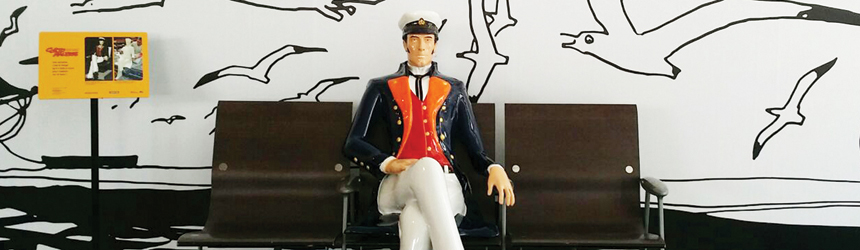
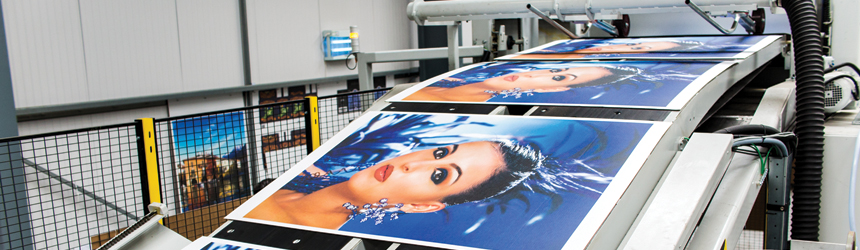
Above: METROPOLE 3D used a Massivit 1800 3D printer to create a life-size replica French comic book character, Corto Maltese.

First in France
METROPOLE 3D, an event management and 3D printing company of Paris, France, emerged from the union of two companies with a background in digital printing and finishing expertise. Both originally offered digital print on various materials and in a number of formats as well as mold machining and manufacturing.

“It was time to start a new project, take 3D modeling to a new dimension,” says Denise Zanet, associate director, METROPOLE 3D.
METROPOLE 3D now manufactures polyester lamination pieces directly with 3D printing technology. In addition to wide format 3D printing, the company offers advertising, digital printing, and sublimation services.

With five workshops and 105 employees, METROPOLE 3D’s staff boasts expertise in areas from computer assisted publications to installation. From a 5,500 square meter work area, the company mainly offers its services to France and neighboring European countries.

METROPOLE 3D’s clientele includes automotive industries, airports and transit facilities, exhibition parks, local businesses, museums, outlets, shopping centers, and theaters. “Being the first French out-of-home print house to offer 3D printing is an incredible competitive advantage. It enables us to provide something truly unique to customers while adding a new dimension to our business,” offers Zanet.

With 3D technology, the company often creates wide format prototypes and product reproductions. Zanet believes 3D printing offers the ability to produce attention-grabbing, larger-than-life displays in a short period. “We transform the way high-level themed projects are created, particularly in hospitality, architectural sectors, and the art market,” she explains.

To promote its 3D services, METROPOLE 3D maintains a constant influx of visits from returning clients and prospective clients. They need to first see the technology in action to know and understand the possibilities of implementing 3D printing into campaigns and activities.

Massivit Gel Technology
In 2016, METROPOLE 3D purchased two Massivit 1800 3D printers. The Massivit 1800 allows users to print personalized objects, localize objects to scan, and create illuminated displays. The printers feature a maximum size of 5.9 feet in height, 4.9 feet in width, and 3.9 feet in depth.

The Massivit 1800 prints up to 14 inches per hour. It includes optional dual-object printing for printing two different objects in parallel. Its print speed plays a key role in accelerating METROPOLE 3D’s production turnaround time—enabling the company to consistently meet customer deadlines.

The devices feature a touchscreen printer controller and a vacuum print table with printing liner for easy handling.

A hybrid technology, the Massivit 1800 includes a gel-like photosensitive polymer dispensed layer by layer and then cured. The company uses Massivit Dimengel. During the printing process, the gel is dried by UV lamps positioned near the printhead.

Dimengel allows for the printing of supersized lightweight objects. It is a proprietary photo-polymeric acrylic gel with UV-sensitive properties that allow rapid layering and curing using low energy UV light. After curing, 3D printed objects are immediately ready for handling without the need for post-curing or post-processing. Objects printed with Dimengel are receptive to various types of finishes.

Massivit Smart is Massivit 1800’s proprietary software for 3D file preparation. It enables scaling, rotating, slicing, and support generation for stereolithographic files. The software outputs a ready-to-print file for the printer that’s optimized for selected print modes.

Zanet credits demand for 3D printing from multiple industries for the company’s decision to purchase the two printers. “Combining the most efficient production workshop in digital printing on the French market with the highest performance expertise in assemblage, polishing, varnishing, and painting of prototypes and models for confidential sectors such as aeronautics and automobile, allows us to vision this new market with very big expectations,” she says.

With the Massivit 1800, Zanet believes METROPOLE 3D can answer all 3D demands and projects. “We are able to build anything in a very short time. Strengthened by both expertise and work capacity, we have the ability to touch the sky,” she offers.

Replicating Pop Culture
In 2017, SNCF Gares & Connexions and CASTERMAN approached METROPOLE 3D for a life-sized statue of comic book adventurer Corto Maltese. Popular in French culture, Corto Maltese is a character in a series of novels from writer Hugo Pratt. The client’s goal was to capture the audience’s attention and create conversation for the novel’s 50th anniversary.

METROPOLE 3D used Dimengel with the Massivit 1800 to print the life-size Corto Maltese. Massivit’s patented Gel Dispensing Printing technology is a balance of print engine movement speed and algorithms to 3D print supersized objects.

The model was divided into eight pieces to create one sitting Corto Maltese, wwhich was 52 inches tall, 44 inches wide, and 25 inches in depth. The company had three weeks to install the product, which required additional finishing after installation. “We also had to decide how to adapt the shape of the model to the 3D printing process because we wanted Corto Maltese to resemble the fictional character as much as possible,” says Zanet.

Finishing the 3D print job included polishing the sculpture, lacquering, and spray painting for a life-like appearance in addition to gluing and sanding.

The 3D job was completed in 200 hours including 25 hours to create the 3D files, 70 hours of printing, and over 105 hours of modeling. The 3D printed Corto Maltese was exhibited at the Gare de Paris in Austerlitz, France until October 2017.

According to Zanet, the clients were very pleased, amazed, and thankful for the 3D printed Corto Maltese. “It’s a feat to realize the project was completed in such a short amount of time with high-quality and magnificent rendering,” she explains.

3D Printing
The use of 3D printers in wide format applications is accelerating across industries and countries. Advancements in 3D print technology, like those from Massivit, allows print providers and manufacturers to create life-sized objects with fast turnarounds and little error.

Nov2017, Industrial Print Magazine

Taking Tiles to A New Level

By Melissa Donovan

Printing directly to industrial materials like ceramic requires robust devices. Ultimately the printheads and ink—driven by the printer—must be durable enough to handle the task at hand. Companies in markets such as tile manufacturing look to digital printing as a means of expanding their product portfolios in creative, unique ways.

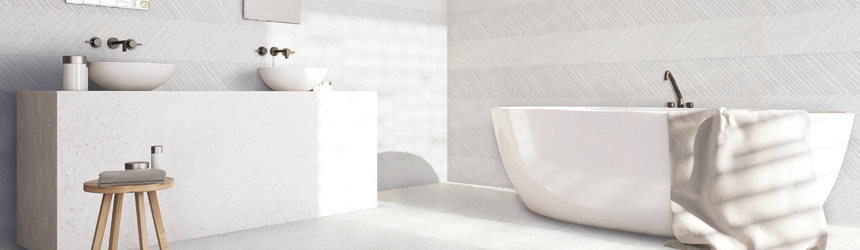
In business since 1989, Cicogres manufactures ceramic products derived from the finest raw materials. These include tiles ultimately used for floors and walls inside and outside like kitchen backsplashes, mud room floor tile, and bathroom counter tops. Cicogres’ main customer base consists of national and regional tile distributors to home centers.

With a 485,000 square foot production plant in Vilafames, Castellón, Spain and a 650,000 square foot logistics plant situated an hour away from Valencia port—one of the most important seaports in Spain—the tile manufacturer maintains a presence in 110 countries worldwide. Its staff consists of 195 employees.

Above: Cicogres works with EFI Cretaprint printers powered by Xaar printheads to create decorated tiles used in bathrooms.

Building a Foundation
Cicogres integrated digital printing technologies into its operation in 2009. Prior to that, it used rotary serigraphic screens to print its tiles. With traditional tile decoration devices, the manufacturer was limited to developing five or six designs at a time. With digital it develops close to 100 designs and produces thousands of tiles each day.

With digital the goal is to address the tile manufacturer’s focus on being a vanguard in terms of innovation and standout from the competition—creating new and different tile designs. “We want to focus our efforts on quality production and design in order to differentiate ourselves in an extremely competitive market. In short, we want to satisfy the most demanding customer needs,” shares Ricardo Baldayo, technical director, Cicogres.

It chose EFI Cretaprint to achieve this. Since Cicogres lacked experience with digital technologies it looked to EFI for assistance and the company delivered. “We can state that the adaption to this technology was fast, efficient, and very satisfactory from the beginning,” attests Baldayo.

Since the first EFI Cretaprint install, Cicogres now runs multiple devices in its facility using ink from Esmalglass-Itaca, a long-term supplier of the company. The two collaborate on solutions specifically for Cicogres’ needs, which help in achieving high quality in all of the company’s tile offerings.

Improvements Under the Hood
A printer is only as good as the printheads it employs. Cicogres has relied on printheads from Xaar for the last eight years for its digital tile decoration process. The range includes Xaar 1002 printheads in its EFI Cretaprint devices like the GS6, GS12, and GS40.

The tile manufacturer upgraded its EFI Cretaprint devices in 2014 with Xaar 1002 GS40 printheads. This occurred in relation to the introduction of new inks from Esmalglass-Itaca, one of the first special effect inks of its kind with intense color and gloss.

According to Israel Sanchez, owner, Cicogres, updating the printheads was an important step in enabling access to more intense colors and a glossy overglaze. “We need to fire some tiles at very high temperatures and this sometimes affects the color density of the existing inks. The inks enhanced a number of tile designs with richer, deeper colors.”

With this printhead change and ink introduction, Cicogres launched several new tile designs. One of which is the Hampton. A porcelain, it features relief effects and a glossy overglaze.

In 2017 it upgraded an EFI Cretaprint CX3 device with Xaar 1003 printheads. This particular printer model is available with up to eight inks. It can handle a maximum tile thickness of 30 millimeters, maximum length of 3,000 millimeters, and maximum width of 696 millimeters.

The Xaar 1003 features improvements in print quality over the Xaar 1002. Specifically, the newer printhead includes XaarGuard. This provides mechanical protection to the nozzle, which reduces the frequency of maintenance to once per shift or less.

Another improvement in the printheads is the use of Tuned Actuator Manufacturing, which ensures actuator performance in each printhead is optimized. This achieves uniform print quality across all printheads in a print bar, and at different grayscale levels.

In addition to the enhancements, the Xaar 1003 printheads also utilize Xaar’s TF Technology with Xaar Hybrid Side Shooter architecture. This allows the ink to be recirculated directly past the back of the nozzle during drop ejection at high flow rates. Ideal for industrial environments, the printhead is ensured to operate reliability—ink is in constant circulation, preventing sedimentation and nozzle blockage when jetting.

The upgrade from the Xaar 1002 to the Xaar 1003 was without challenges. According Baldayo, the machinery updating process is quick and simple, consisting of replacing the printheads and their electronic components. Xaar designed the 1003 printhead to be backwards compatible so that users of the 1001 or 1002 printheads could easily upgrade their systems.

“In terms of performance, we see that this printhead is faster than previous printheads. And because we don’t need to adjust the printheads or clean them, production uptime has increased as well as print quality. We already notice an improvement at a production level, increasing the line productivity thanks to the modifications we incorporated,” says Baldayo.

The new printheads allow Cicogres’ production team to rarely stop the tile decoration process due to the printer, if anything an error that causes a stoppage relates to another point in the production line. With this success, the plan is to continue upgrading throughout its fleet of EFI Cretaprint printers.

Ceramic Forges Ahead
Digital technology is an important part of Cicogres’ business. “It allows us maximum product customization in regards to market trends, allowing us to respond to customer demand,” shares Baldayo.

Printhead upgrades by Xaar that are compatible with EFI Cretaprint technology and ink from Esmalglass-Itaca enable Cicogres to be not only a manufacturer but an innovator when it comes to tile designs. It placed itself at the forefront of the digital industrial revolution with an early adoption of digital and consequently keeps consistent pace with upgrades. Through all of this it maintains its commitment to providing high-quality tiles to its customers.

Nov2017, Industrial Print Magazine

Getting Sticky With It

By Cassandra Balentine

Digital print enables personalization as well economical short runs. One application trending is labels. The ability to offer cost-effective runs in the hundreds presents value to start ups as well as big brands looking to experiment with versioning.

While digital penetration is still fairly low when it comes to the overall label printing industry, it is a growing market.

Companies looking to add a new revenue stream may want to consider investing in printing and finishing equipment that supports digital label production. Some wide format printers and printer/cutters are ideal for this application, as well as stickers and decals. Dedicated digital label systems are another option.

Here we profile three very different print providers, each offering digital label production in some capacity.

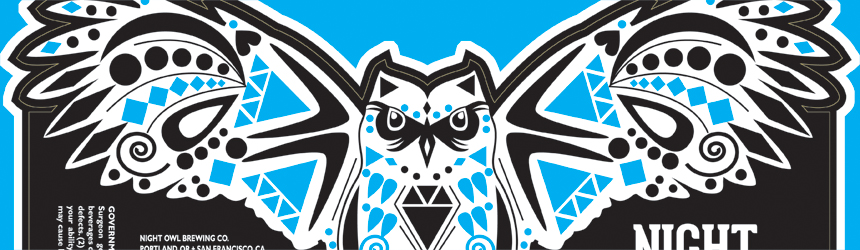
Above: DLS, headquartered in Itasca, IL uses an INX NW210 to produce labels for a range of markets, like breweries in the beverage industry.

Branching Out
Our first example illustrates the expanded capabilities a wide format printer/cutter presents to a small three-person run print shop. Situated in Costa Mesa, CA, Inkgenda is a print service provider (PSP) passionate about the industry it serves. Jim Gray, partner, Inkgenda, evolved from professional skateboarder to business owner. His print background stems from his days as the owner of Acme Skateboards, where he was introduced to screenprinting.

The road to Inkgenda began when Gray decided to create decals and stickers for the skateboard brand in house. The business as it exists today started in 2009, and primarily consists of screenprinting stickers for well-known skate and surf brands. It’s Gray’s background and knowledge of the industry that keeps the shop’s clients loyal and happy. “We have a broad base of customers. Our model is different in that we don’t have salespeople. I was a professional skateboarder and have gotten to know many in that industry. What drifts outside of these types of clients is from referrals,” explains Gray.

While a majority of the shop’s business is produced with screenprinting methods, Inkgenda decided to invest in digital print technology about three years ago. This decision was based on demand from customers asking for different types of work as well as lower volume sticker runs. A wide format printer would meet these needs. When it was time to shop for a machine, Gray was referred to Roland DGA Corporation by a fellow skateboarder that worked for the printer manufacturer. Shortly after, a Roland VersaCAMM printer/cutter was installed.

Since the addition of its digital wide format printer, the PSP expanded its services with lower runs of stickers, and the addition of new applications like labels, decals, and wide format output like banners, posters, and point of purchase displays. The company has also digitally print and cut labels for water bottles, beer bottles, and other containers.

The Roland VersaCAMM runs Roland Eco-Sol MAX inks and Inkgenda favors a range of media, including products from 3M Commercial Solutions, FLEXcon, and General Formulations. In addition, it employs a standalone Summa America LLC cutter.

A lot of the work Inkgenda completes is still better suited for traditional analog processing, but when the volume makes it a close call, Gray says the decision to use digital or screenprinting often comes down to color. “If it’s one or two colors, screenprinting is typically more efficient,” he offers. He points out that for jobs with six or eight colors, digital makes more sense.

The company follows the general rule of thumb that if an order over a couple of thousand comes in at one or two colors, it’s usually screenprinted. Gray stresses that they don’t limit themselves by these guidelines. Occasionally, a job will come through the door that makes sense to utilize both printing capabilities. “If someone needs a fluorescent or metallic color that we can’t digitally reproduce, we print the effect on the screenprinter and move it to digital for cutting rather than creating a die. As a business, we use versatilities that we learned, and we keep getting more versatile.”

Gray estimates that about 70 percent of its work is still produced with screenprinting. Its digital capabilities make up a smaller, but rapidly growing segment of the overall business.

When the press was first installed, the team had theories about how long it would take to pay for itself. “Now it never stops printing. More projects are requested in the lower volumes and we serve more start ups asking for smaller numbers,” offers Gray.

Inkgenda’s digital print capabilities complement its traditional business. With digital wide format printing, it is able to take on different types of jobs—like labels, as well as accommodate lower runs of stickers and decals. By taking advantage of the latest technologies, in addition to its own versatility and personality, the shop experiences success without stress. “We have fun with what we have. The customer base isn’t made up of big purchase orders from random people; they are all in direct contact with us. Half of our customers can text us their orders,” he shares.

Accommodating Demand
Next, we profile a PSP that added digital label printing capabilities a few years ago to accommodate the latest demands. Strategic Print Solutions (SPS) is a print provider located out of a 12,000 square foot facility in Hiawatha, IA. Established in 1996, it operates with 19 employees.

The company got its start by offering high-quality remanufactured toner cartridges to local technology companies. To better serve its clients, SPS expanded based on customer demand. The cartridge business eventually evolved to providing service repairs to copying machines, then selling new machines, and then expanded into creating small print jobs.

Today, the company offers a range of print services, from post cards, business cards, and booklets to wide format products like posters, blueprints, and canvas printing. Recently, the company decided to add label printing. SPS serves a lot of retail customers, including grocery stores, breweries, and dairies. Adding label production made sense to better help these clients.

Casey Ealy, president, SPS, admits that while its label business is currently minimal, the service is just getting up and running and is expected to pick up rapidly. The goal is to have it be one third or more of its business by the end of 2017.

The company set out on its journey to find the right label printer about a year ago. This decision was sparked by requests by two of its existing clients. The SPS team hit the Labelexpo floor in 2016 and came across the Epson SurePress L-4033AW. They were intrigued by its ease of use, footprint, and price tag. “It seemed like a great starter machine for us,” shares Ealy.

Since its installation, the company produces runs that are typically 1,000 to 2,000 labels. It uses Epson ink and media from Mactac Distributor Products for label production.

Ealy comments that advancements in digital made it easier to invest in a label press. “The Epson SurePress L-4033AW allows us to print labels and opened the door to many new clients and revenue streams,” he adds.

More Business
Finally, we spotlight Diversified Labeling Solutions (DLS), a business-to-business supplier of high-quality, custom-printed pressure-sensitive labels that began offering digital services several years ago.

Established in 1985, DLS offers everything from blank to full-color high-definition labels produced using a variety of equipment. The company operates facilities located in five states—including Atlanta, GA; Cincinnati, OH; Dallas, TX; and Reno, NV—and is headquartered in Itasca, IL. Overall, it employs over 200 people.

The company invested in its first digital press in 2011. “We are motivated by conversations with distributors where there is a desire to work together in order to come up with a unique solution for an end user,” says James Cirigliano, director of marketing, DLS.

DLS initially settled on the INX International Ink Co. NW140 narrow web digital press for its small footprint, small amount of waste generated, durable inks, and the ability to print on nearly every type of material without the need for a topcoat. Two years later, the company invested in the INX NW210 inkjet UV digital narrow web press. The INX NW210 offers speeds of up to 80 feet per minute and incorporates JetINX Printhead Drive Electronics and Recirculation System.

For its label production, it runs INX ink and uses a range of media, its go-to is a semi-gloss polypropylene material. It also operates flexographic and offset printing equipment, as well as butt splicers, turret rewinders, and laser die cutting services.

Since the implementation of the INX digital label presses, DLS is seeing more digital business come through the door. “We have opened up the market for smaller jobs that were costly to run on flexography,” he shares.

Cirigliano says DLS’ customer base is distributors. “Our jobs can really cover just about any market. What runs on the INX NW210 the most are warehouse rack labels and signage, or durable labels. We see a lot of marketing labels for the short runs,” he offers.

When determining whether to run a job on flexographic or digital, the primary determining factor is the size or number of labels for the job. “The breaking point is somewhere around 7,000 to 10,000 feet of material,” says Cirigliano. “Beyond that, it is more economical to run them on our flexographic equipment.”

For its digital work, typical runs are usually in the 500 to 10,000 foot range, but can be as long as 20,000 or 30,000 feet. The INX NW210 produces both labels and tags for the print provider and Cirigliano estimates that about ten to 15 percent of its business is currently made up of digital jobs.

DLS plans to continue to grow its fleet of digital presses and expand into new markets. “We see more work for the digital world as it becomes more popular,” concludes Cirigliano.

Added Offerings
Digital label printing equipment comes in many forms, from dedicated, entry- to production-level systems to wide format printer/cutters. Adding digital to a traditional printing environment enables print providers like Inkgenda and DLS to effectively handle short-run demands. For SPS, adding label printing is a new adventure made possible with advanced technology.

Each of these three examples indicates the growing interest for digital label applications and the variety of solutions available to support demand.

Nov2017, Industrial Print Magazine

Fairway Fashion

By Cassandra Balentine

The ability to print digitally is beneficial for startups looking to establish a brand. Those with a vision and determination get to market quickly. One such company is Bad Birdie, a golf clothing brand launched in May 2017 out of Los Angeles, CA.

The clothing line came to life in just a few months. Jason Richardson, founder, Bad Birdie, says he was driving from AZ to LA last Thanksgiving when his business idea struck. It was then he formed the concept of a golf polo company committed to bringing a new, daring look to the course. The line consists of polo shirts that offer style, boldness, and freshness.

Bad Birdie’s polo shirts feature bright colors and fun prints, like a neon Aztec pattern, a blue and red leopard print, and classy neon lightning bolts. “We make golf polo shirts for players whose style is as fresh as their game,” comments Richardson.

Above: Golf clothing brand Bad Birdie of Los Angeles, CA offers unique golf shirts created with digitally printed media from Top Value Fabrics by Stanton Calprints of Montebello, CA.

Setting Themselves Apart
With many established brands to contend with, its prints set them apart from the competition. “Our main differentiator is our designs,” says Richardson. The company launched with 12 designs from various creative professionals, and the plan is to add more over time.

The shirts are versatile in their own individual way. “Our polos are hand sewn in Los Angeles and designed to fit perfectly while crushing your driver, sinking a birdie putt, or drinking an adult beverage,” adds Richardson.

Print and Manufacturing Partners
Bad Birdie relies on integral relationships with vendors to print and produce its shirts in a timely manner.

In addition to its unique style, the polo shirts are manufactured with quality in mind. This starts with a premium digitally printable fabric from Pacific Coast Fabrics. Originally, the company was looking into creating a custom fabric through a different manufacturer, but found Pacific Coast Fabrics’ products to meet its needs with a speedy turnaround time. The premium fabric is made in Los Angeles and features moisture-wicking and anti-odor functionality.

The Bad Birdie brand is about the look, but also the quality of its clothing. To turn the designs into a desirable product, Richardson sought out print and manufacturing professionals for production.

As a startup, it’s important to keep manufacturing costs down and runs low. Richardson says he chose to partner with Stanton Calprints, Inc., based on the service and fast turnaround it is able to provide Bad Birdie.

The print provider is based out of Montebello, CA. Operating out of a 25,000 square foot facility, it is a fabric printer well versed at providing fabrics to the garment trade of Southern, CA. Since the 1980s, the company has relied on sublimation printing to create active wear garments made with blended fabrics.

On its website, the shop notes that it expanded from just three transfer machines in 1995 to six rotary presses, two large flatbed presses, and four high-quality inkjet printers equipped with special sublimation inks today, along with proprietary equipment for producing both engineered and custom prints for a variety of applications.

With this setup, the print provider quickly produces samples and accommodates shorter runs for clients similiar to Bad Birdie.

After the polo shirts are sublimated by Stanton Calprints, they are manufactured into the final product from a finishing partner in Los Angeles. “Runs normally take about two weeks, but I have a great vendor who understands the quick turnaround needs of a startup and can make the polo shirts quicker if necessary,” shares Richardson.

The products are primarily sold online directly through Bad Birdie’s website. Stocking them in golf pro shops is a future goal.

Because the company’s polo shirts are digitally printed, maintaining a stock of inventory isn’t necessary. “We try to keep a stock inventory, but with the success of our launch we are selling out and have shirts on backorder,” admits Richardson.

Teeing Off
In three years, Richardson hopes to see his brand on the PGA golf tour. With just a few months under its belt at press time, the company is active in marketing online, showing off its unique designs through its social media handle, @badbirdiegolf. The company offers a modern look for a classic game, and is ready to take over the course.

Nov2017, Industrial Print Magazine
Fusing Fabric

By Melissa Donovan

Welding is an alternative to sewing for finishing digitally printed fabrics. For those not familiar with how to operate an industrial sewing machine, the option of welding is available. It is often used to finish vinyl banners, so many manufacturing businesses or print shops may already have experience using such a device.

The decision to weld versus alternative methods is based on the application, end use, and user. There are different types of welding processes as well—although certain methods are more ideal for fabric over others. As digital printing to fabric gains popularity, welding devices change and adapt to the newest trends.

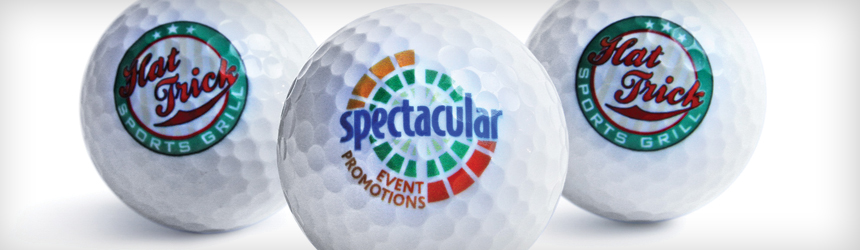
Above: Fabric finished with Matic Ares welders, which are available in the U.S. through Media One.

Why Weld
A welding device is used to finish fabric for many reasons. While sewing machines or seamers are ideal finishing solutions, a welder offers both durability and less material waste, all while providing a clean and polished end product.

According to Christina Lefebvre, area sales manager, NA, Matic S.A., welded fabric is aesthetically pleasing, especially compared to sewing. “There is no stitching running through the print. No matter what the printed image is, there is no way that the weld will interfere with the message. It is invisible. Welding creates a flat, uniform bond between two layers of fabric. In addition, when the fabric is hung, there are no ruffles, therefore the printed image is not disrupted by creases.”

“When welding, operators no longer have to try to thread match or worry about thread rotting when hung outdoors. Welding provides a high-quality seam that can be used in outdoor environments. Some of the largest billboards in the world are welded,” shares Jeannette Hendrickson, marketing manager, Miller Weldmaster.

Traci Evling, managing director, JTE Machine Systems, Inc., lists benefits including lower cost of labor, no weakening—puncturing—of material at the seam, and reduced cost of materials—no thread needed. “In many cases, the amount of fabric used can be reduced, as a sewn seam usually requires a folded hem and a welded seam does not necessarily,” she continues.

Compared to other technologies related to finishing fabric, a welder is not as dependent on a user’s experience level, suggest Rod Butler, business unit manager, Sani USA and Pascal Smeets, sales engineer, Asco BV.

It’s important to note that certain fabric types are more weldable than others. “Most polyester fabric, nonwovens, and some Tyvek-type material can be ultrasonically welded. All PVC/PU unsupported and coated materials can be radio frequency (RF) welded. Non-coated acrylics and nylon material are not easily weldable. True silicone or non-PVC silicone edge graphics are not weldable. Cottons are not weldable without a tape,” recommends Evling.

Tech Differences
Different welding technologies include ultrasonic, hot air or wedge, and impulse.

Hendrickson says that each has its benefits depending on the application. “From our experience, ultrasonic is typically used for lighter textiles and delicate fabrics. Impulse is a static bar that goes up and down, however, as the bar touches the outside surface; it can leave a sheen on the image and does not always produce the most desired look. Hot air or hot wedge welding both use a technology that puts the heat in between the seams leaving the outside print untouched and providing the best looking seams for banners,” she suggests.

Lefebvre argues that there is no possible injury or harm that can come from using an impulse welder. “The electrodes do not stay hot to touch once the weld is completed and the machine does not emit anything harmful.”

“Impulse welding offers accurate temperature and positioning of where the heat is applied. It is also less noisy and inexpensive,” agree Butler and Smeets.

Ultrasonic technology is best for polyester fabrics typically used in digital printing, advises Evling. “With the right settings and tooling, ultrasonic welding can be very fast and easy, without the need for seaming tape or special materials. In an ultrasonic weld, the melt is created within the material itself, as a result of the high frequency vibrating the metal surfaces above and below the material, causing the thermoplastic to melt, and fuse together within a few seconds,” she continues.

Ideal for Fabric
While a number of welding technologies are available, some are more suitable for banner material than fabric. Here are some of the best devices designed for welding digitally printable fabric.

DAP America, Inc. distributes Pfaff Industrial welders in North America. The Pfaff 8320 is programmed as a hot wedge or hot air welding machine. An interchangeable swivel allows it to transform from hot air to hot wedge and back. All parameters are controlled electronically, with one integrated control board monitoring heat sealing temperature, air flow, roller pressure, and two motors for the top and bottom roller.

The Fiab 900 is Fiab’s standard high-frequency device, designed to work with a variety of materials. Features include lasers to make handling fabrics easy, a vacuum table system, weld joint tape application, remote control, and side platforms. There are five versions of the Fiab 900, all with different output powers and welding surfaces.

Forsstrom High Frequency AB offers the TX 200-500 high frequency welding machine. It can be used as a standalone device or complementing a larger system of welders. The machine offers three side access for optimized material handling.

The JTE Sonic Bar Welder welds digital graphic fabrics in short, straight seams in seconds. It uses ultrasonic frequency to weld fabrics without any puckering including recyclable fabrics to non-coated polyesters and acrylics.

Kabar Manufacturing Corporation’s 20 KW standard track and trolley RF welder is ideal for finishing digitally printed fabric. It features impulse sealing capability. Common applications completed include awnings, billboards, and banners.

Leister Technologies LLC offers the Seamtek 900 AT. A multi-arm system guarantees flexibility between multiple applications. It produces lap welds, hems, open hems, piping welds, and tape welds. A test mode allows for quick parameter determination. Guides allow for even the inexperienced user to utilize the Seamtek 900 AT easily.

Media One distributes the Matic Ares and Ares Plus welders. Both are equipped with cooling parameters that allow the electrodes to stay in contact with the fabric after the welding period. According to Lefebvre, this acts as ironing and prevents the fabric from buckling and creasing. All of the welders are fully programmable, meaning the operator can set specific controls just for fabric.

Miller Weldmaster’s Digitran is ideal for finishing digitally printed fabrics. It is an all-in-one sewing and welding solution. A transport system synced with the sewing machine provides precise material handling. The device utilizes a robust high lead sewing machine for maximum uptime with easy-to-use touch controls. It is configured for multiple seam finishes and a driven roller for accommodating any size job.

Sani USA distributes Asco welders in the U.S. The company has manufactured impulse welders as large as 24 feet. Its models include automatic pocket folding and welding, automatic seaming of panels, invisible welding, and data logging and ERP software integration.

Supply55, Inc. offers the BannerPRO banner welding system, which hems for grommets, pole pockets, and pocked sign fabrication. The heavy-duty, all-steel construction is hands free with foot pedal operation. A solid state electronic timer ensures consistent welds every time.

On Point
Trends in this segment of the market affect the newest iterations of welding machines. With digitally printed fabric becoming increasingly popular, finishing hardware is poised to handle an influx of job requests at a rapid response rate.

For example, models like the Matic Ares Plus include a Turbo Device to give an extra boost, cutting the welding time in half versus regular electrodes. “Printers are now so fast that finishing is the bottleneck,” adds Lefebvre.

Hendrickson agrees, citing large customers who have thousands of banners to finish and want solutions that eliminate all of their finishing bottlenecks. “As such, they seek automation, which is able to finish the sides of the banners including grommets and cutting banners to size,” she says.

Application introductions affect welder usage. Evling gives silicone edge graphics systems as one such factor. “Now their edges are typically made from PVC material and are excellent candidates for welding,” she shares.

“We are experiencing a wider range of digital textiles and fabrics that can be printed on because of UV technologies. As an example, most of the billboards are now all polyethylene. Polyethylene is well suited for hot air welding,” explains Hendrickson.

Finishing Fabric
Welding is an ideal alternative to sewing for finishing digitally printed fabric. It not familiar or not ready to invest in a sewing machine, a welder is a good option. Not only does it offer durability, but can save on labor and material costs. A number of welders are available to work with digitally printed fabric, be sure to conduct due diligence prior to purchasing as some are designed for banner and more rugged vinyl materials.

Nov2017, Industrial Print Magazine